This time we’re going bigger than ever. Fabric, Power BI, SQL, AI and more. We're covering it all. You won't want to miss it.
Learn moreLevel up your Power BI skills this month - build one visual each week and tell better stories with data! Get started
I was reading up on Power Apps and came across the following article
https://docs.microsoft.com/en-us/powerapps/maker/canvas-apps/powerapps-custom-visual
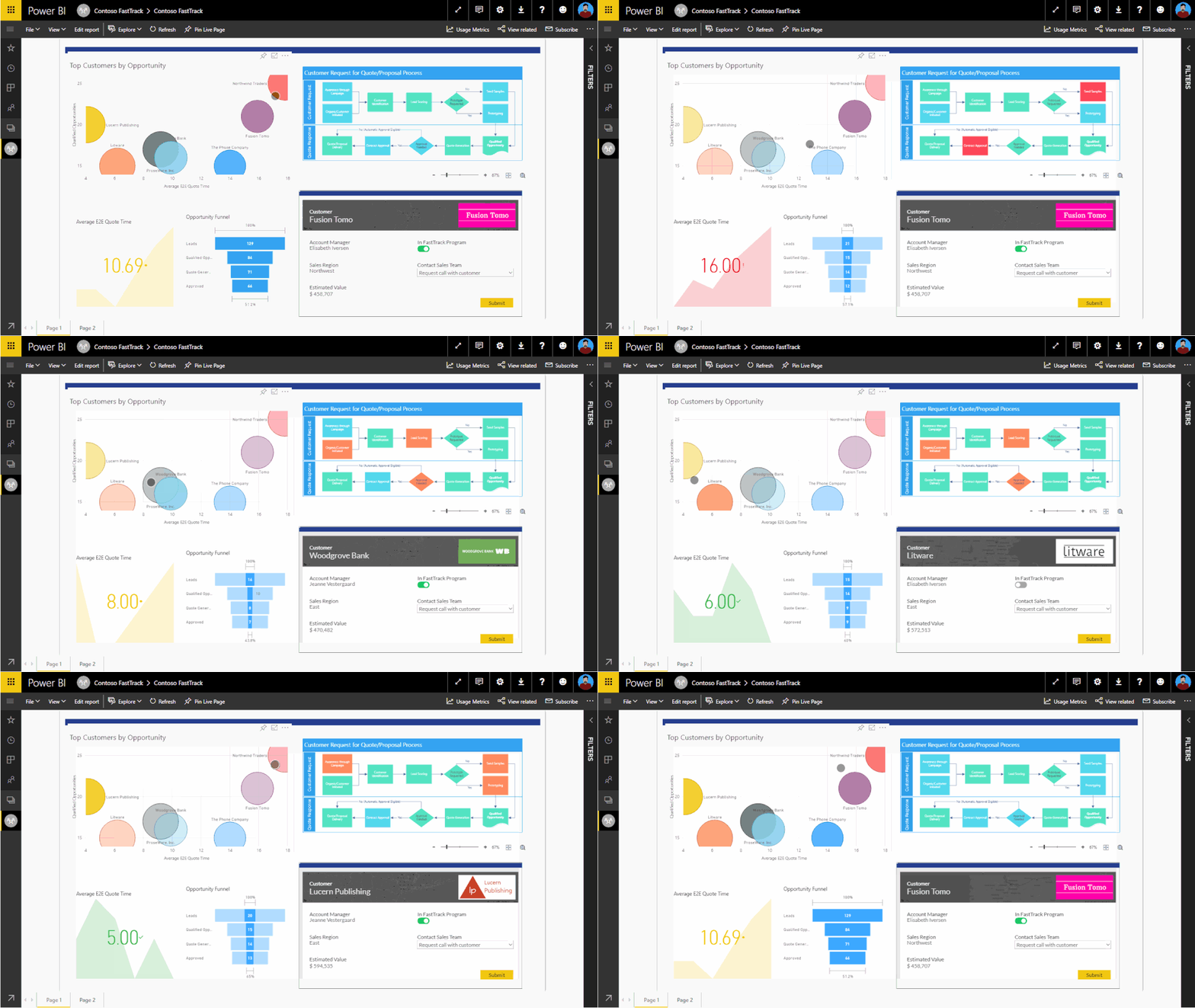
I noticed in the sample picture they showed in this article that there seemed to be a "Process Flow" diagram in the upper right hand corner that was being highlighted along with the data points selected. The lower right hand corner is a Power App
I find this super cool, and this is the first time I am seeing something like this - Does anyone know how this is done or what this visual is called?
Thanks in advance!
Solved! Go to Solution.
Thanks for noting the appsource
I actually found this
https://appsource.microsoft.com/en-us/product/power-bi-visuals/WA104381132?tab=Overview
Not sure if its the exact one as shown in the screen shot but I think its close enough!
I will give it a shot for now and will update if I find anything else in the future
Pretty cool stuff!
Hi, @rodneyc8063_1
It’s the first time I have seen such a visual.
The visual does not exist in the built-in visual library of PowerBI.
I suspect it may also be a PowerApp visual.
Best Regards,
Community Support Team _ Eason
Good to know its not something I missed that is a default out of the box visual.
I wonder if this is a custom visual?
Since its a screen shot from a Microsoft article I was hoping it was something "official" from Microsoft
Its pretty cool to be able to show the process flow as well
Hi, @rodneyc8063_1
Are you referring to the custom visuals in AppSource?Sorry, I also did not find any similar visualization here.
https://appsource.microsoft.com/en-us/marketplace/apps?product=power-bi-visuals
If you are a pro user, you can consider opening a support ticket with MSFT for consultation.
https://powerbi.microsoft.com/en-us/support/pro/
Best Regards,
Community Support Team _ Eason
Thanks for noting the appsource
I actually found this
https://appsource.microsoft.com/en-us/product/power-bi-visuals/WA104381132?tab=Overview
Not sure if its the exact one as shown in the screen shot but I think its close enough!
I will give it a shot for now and will update if I find anything else in the future
Pretty cool stuff!
Check out the April 2026 Power BI update to learn about new features.
Sign up to receive a private message when registration opens and key events begin.
If you have recently started exploring Fabric, we'd love to hear how it's going. Your feedback can help with product improvements.
| User | Count |
|---|---|
| 11 | |
| 9 | |
| 9 | |
| 7 | |
| 6 |
| User | Count |
|---|---|
| 44 | |
| 27 | |
| 25 | |
| 22 | |
| 22 |