This time we’re going bigger than ever. Fabric, Power BI, SQL, AI and more. We're covering it all. You won't want to miss it.
Learn moreGet Fabric Certified for FREE during AI Skills Fest. This week only. Secure your voucher now.
Hello everybody.
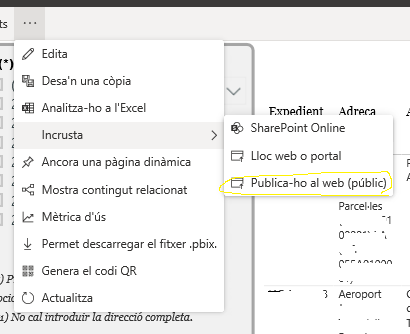
To date I have had no problem creatin web links for my power BI projects. Using this link (http://app.powerbi.com/,,,,) I uploaded the files of Power BI desktop. Then, I click to embed and "Publish it on the web".
Until today, no problem.
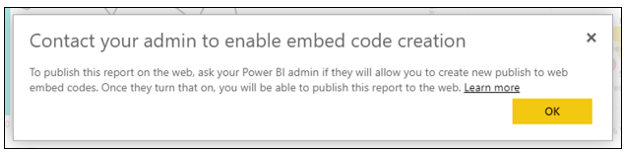
Today, i get the following error:
"Contact your administrator to enable embed code creation. To publish this report to the web, ask your Power BI administrator to create new embedding codes for your publication on the web. Once you enable this feature, you can publish this report on the web. More information"
I'm the owner, I'am the creator of Power BI file. Does anyone know what may have changed and what can I do to get web links back?
Thank you!
Hi, @OriolBach
Based on your description, you may contact users who are Global Admins in Office 365 or have been assigned the Power BI service administrator role. The full admin portal is accessible to them. They can go to the admin portal and configure the 'Tenant settings'.
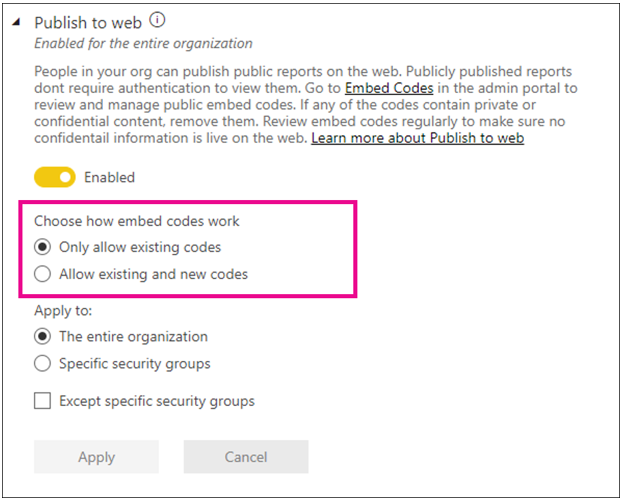
The Publish to web setting gives options for which users can create embed codes.
Users are asked to contact the Power BI admin to allow them to create an embed code when the Choose how embed codes work option is set to Allow only existing embed codes and the Publish to web setting is Enabled.
Therefore, you may contact the Power BI admin to tick 'Allow existing and new codes'. For further information, you may refer to the following link.
https://docs.microsoft.com/en-us/power-bi/service-admin-portal
Best Regards
Allan
If this post helps, then please consider Accept it as the solution to help the other members find it more quickly.
Check out the May 2026 Power BI update to learn about new features.
Sign up to receive a private message when registration opens and key events begin.
If you have recently started exploring Fabric, we'd love to hear how it's going. Your feedback can help with product improvements.
| User | Count |
|---|---|
| 14 | |
| 10 | |
| 10 | |
| 8 | |
| 7 |
| User | Count |
|---|---|
| 37 | |
| 32 | |
| 29 | |
| 22 | |
| 20 |