FabCon is coming to Atlanta
Join us at FabCon Atlanta from March 16 - 20, 2026, for the ultimate Fabric, Power BI, AI and SQL community-led event. Save $200 with code FABCOMM.
Register now!- Power BI forums
- Get Help with Power BI
- Desktop
- Service
- Report Server
- Power Query
- Mobile Apps
- Developer
- DAX Commands and Tips
- Custom Visuals Development Discussion
- Health and Life Sciences
- Power BI Spanish forums
- Translated Spanish Desktop
- Training and Consulting
- Instructor Led Training
- Dashboard in a Day for Women, by Women
- Galleries
- Data Stories Gallery
- Themes Gallery
- Contests Gallery
- Quick Measures Gallery
- Notebook Gallery
- Translytical Task Flow Gallery
- TMDL Gallery
- R Script Showcase
- Webinars and Video Gallery
- Ideas
- Custom Visuals Ideas (read-only)
- Issues
- Issues
- Events
- Upcoming Events
To celebrate FabCon Vienna, we are offering 50% off select exams. Ends October 3rd. Request your discount now.
- Power BI forums
- Forums
- Get Help with Power BI
- Service
- Re: Problem with Codepage / Special character viui...
- Subscribe to RSS Feed
- Mark Topic as New
- Mark Topic as Read
- Float this Topic for Current User
- Bookmark
- Subscribe
- Printer Friendly Page

- Mark as New
- Bookmark
- Subscribe
- Mute
- Subscribe to RSS Feed
- Permalink
- Report Inappropriate Content
Problem with Codepage / Special character viuialisation
Hello everybody
maybe you can help me with my actual Power BI problem, which causes me a lot of troubles during my first walking attempts with PB:
My datasource is a DB2-database (encoding ISO8859-1).
The preview of the imported data in Power Bi shows problems with german special characters, like ‘ö’, ‘ä’, etc.
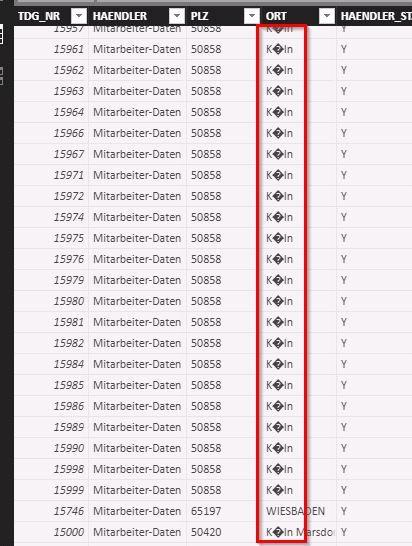
- tried the following solutions until now:
checking the general language setting:
-> set to German
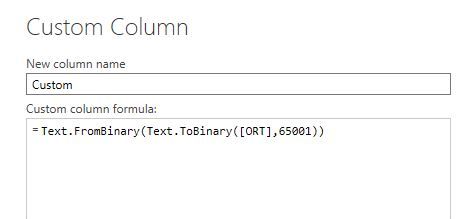
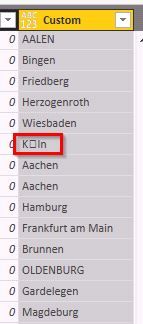
->Refreshing the data, but without success - adding a custom column in order to adapt the language-problem:
But the result look quite similar as the original column…
I tried several different enodings, but without success.
Can you help me out???
Regards Ralf


- Mark as New
- Bookmark
- Subscribe
- Mute
- Subscribe to RSS Feed
- Permalink
- Report Inappropriate Content
Hi @Ralfk,
Based on your information, I'm a little confused about your requirement.
Do you want to convert the special character in german to standard character?
I'm not good at Power Query, @ImkeF may help you.
In addition, you could share some data sample and your desired output so that we could understand your requirement better and get the solution.
Best Regards,
Cherry
If this post helps, then please consider Accept it as the solution to help the other members find it more quickly.
- Mark as New
- Bookmark
- Subscribe
- Mute
- Subscribe to RSS Feed
- Permalink
- Report Inappropriate Content
Hi Cherry,
i'm sorry to confuse you!
Well let's try to give some more details:
These German special characters are already stored correctly in the DB2 -database.
Example:
The town, 'Cologne' is called in German 'Köln'. This is what I wanted to see in my example instead of these strange symbols....
In general I can retrieve these data out of the DB and visualize it without any problems.
And as I'm working in the same PC with Power BI and other BI-tools, I can not understand what goes wrong .....
I hope to explain my problem a little bit clearer now....
Regards Ralf


- Mark as New
- Bookmark
- Subscribe
- Mute
- Subscribe to RSS Feed
- Permalink
- Report Inappropriate Content
Tbh, that's not my strong suit and I also alway play around with different encodings.
Lately I had some cases where 65001 and 1250 worked (I'm sitting in Germany as well).
Otherwise you can try to apply the decoding with an optional parameter in your first import-step already: https://msdn.microsoft.com/en-gb/query-bi/m/db2-database
Imke Feldmann (The BIccountant)
If you liked my solution, please give it a thumbs up. And if I did answer your question, please mark this post as a solution. Thanks!
How to integrate M-code into your solution -- How to get your questions answered quickly -- How to provide sample data -- Check out more PBI- learning resources here -- Performance Tipps for M-queries
- Mark as New
- Bookmark
- Subscribe
- Mute
- Subscribe to RSS Feed
- Permalink
- Report Inappropriate Content
Hi Imke,
thanks for your reply!
I must adsmit that I have no idea how to implement your advice.....
Is this a function I have to add in the query definition??
Regards Ralf
- Mark as New
- Bookmark
- Subscribe
- Mute
- Subscribe to RSS Feed
- Permalink
- Report Inappropriate Content
Hi @Ralfk,
Have you solved your problem?
If you have solved, please always accept the replies making sense as solution to your question so that people who may have the same question can get the solution directly.
Best Regards,
Cherry
If this post helps, then please consider Accept it as the solution to help the other members find it more quickly.
- Mark as New
- Bookmark
- Subscribe
- Mute
- Subscribe to RSS Feed
- Permalink
- Report Inappropriate Content
You have to tweak the code where you import from the DB2-database.
Currently it should look like so:
DB2.Database(<YourServername>, <YourDatabasename>)
try adding a "1" in a record at the end:
DB2.Database(<YourServername>, <YourDatabasename>, [BinaryCodePage= 1])
Imke Feldmann (The BIccountant)
If you liked my solution, please give it a thumbs up. And if I did answer your question, please mark this post as a solution. Thanks!
How to integrate M-code into your solution -- How to get your questions answered quickly -- How to provide sample data -- Check out more PBI- learning resources here -- Performance Tipps for M-queries

Helpful resources

Power BI Monthly Update - September 2025
Check out the September 2025 Power BI update to learn about new features.


