cancel
Showing results for 
Search instead for 
Did you mean: 

The Power BI Data Visualization World Championships is back! Get ahead of the game and start preparing now! Learn more

Reply
vishnuragas
Frequent Visitor

PowerBI: Timestamp in the reports and dashboard do not match

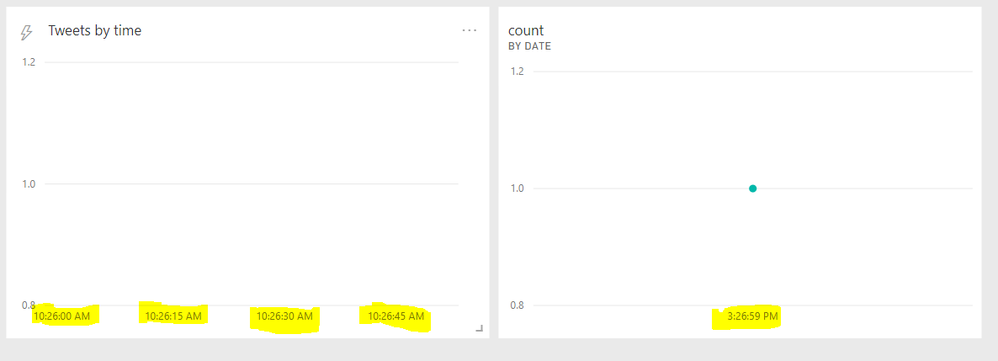
I have an R script which scraps tweets for a specified interval. The timestamp returned matches my current local time. - I created a streaming dataset and pushed these tweets to power BI pro using their REST API. - But when I use historical data and create a report, there is a difference in time stamp that gets displayed in the graph. Is there a setting that I have to change within Power BI?


report and dashboard time.PNG


The left is the graph created in the dashboard (showing current local time) and right is the report which I tried to create (shows a different time stamp) and pinned it to the dashboard. (Its just one data point I have shown here)

2 REPLIES 2
v-yuta-msft
Community Support
Community Support

Hi vishnuragas ,


Yes, this may be caused by the time you have scraped has not be converted to local time, you can create a calcate columnn to convert time column in localtime formatting.


Regards,

Jimmy Tao

GilbertQ
Super User
Super User

Hi there


It could possibly be that all the Power BI Servers dates and times are at UTC.


So when it is being refreshed it is then using the local time of the servers which is UTC?


Did I answer your question? Mark my post as a solution!

Proud to be a Super User!


Power BI Blog

Helpful resources

Announcements
Power BI DataViz World Championships

Power BI Dataviz World Championships

The Power BI Data Visualization World Championships is back! Get ahead of the game and start preparing now!

December 2025 Power BI Update Carousel

Power BI Monthly Update - December 2025

Check out the December 2025 Power BI Holiday Recap!

FabCon Atlanta 2026 carousel

FabCon Atlanta 2026

Join us at FabCon Atlanta, March 16-20, for the ultimate Fabric, Power BI, AI and SQL community-led event. Save $200 with code FABCOMM.