cancel
Showing results for 
Search instead for 
Did you mean: 

Learn from the best! Meet the four finalists headed to the FINALS of the Power BI Dataviz World Championships! Register now

Reply
jvandermale
New Member

Pro Licensing Issue

Hello,


I'm having an issue with my license. I signed up for pro and am paying for it but when I try to access certain features such as workspaces it says I need to upgrade my account to pro. I think they may have accidentily set me up for the trial version. Please let me know how to proceed to get this resolved.


Thank you

2 REPLIES 2
Anonymous
Not applicable

Hi @jvandermale,


As guavaq said, you can contact your office admin to check your account licenses.


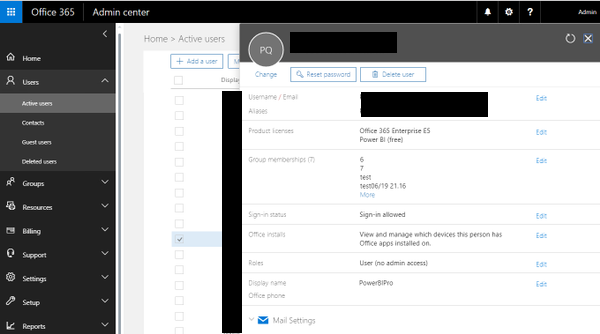
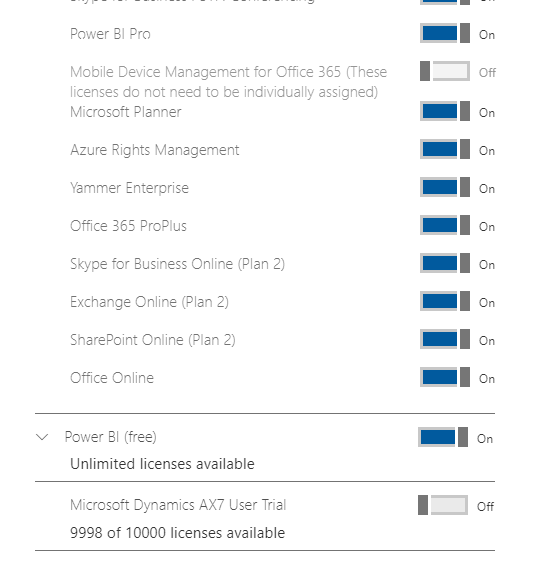
Account information location:

Admin center -> Active users -> Product licenses -> Edit.

large.png


F3400251.PNG


Regards,

Xiaoxin Sheng

GilbertQ
Super User
Super User

Hi @jvandermale


I would suggest chatting to your Office 365 admin, because if you have a Pro Trial you can create App Workspaces etc.


What I am thinking is that they gave you a Power BI Free license.

A way to check if you have a Power BI Free License is to create a Dashboard. And try and share the dashboard.

If you do the above and it prompts you to Upgrade, I am pretty confident that you have got a Power BI Free license.


Once you know that, you could then ask your Office 365 Admin to assign a Power BI Pro license to your account.


Did I answer your question? Mark my post as a solution!

Proud to be a Super User!


Power BI Blog

Helpful resources

Announcements
Join our Fabric User Panel

Join our Fabric User Panel

Share feedback directly with Fabric product managers, participate in targeted research studies and influence the Fabric roadmap.

March Power BI Update Carousel

Power BI Community Update - March 2026

Check out the March 2026 Power BI update to learn about new features.