cancel
Showing results for 
Search instead for 
Did you mean: 

The Power BI Data Visualization World Championships is back! Get ahead of the game and start preparing now! Learn more

Reply
JMckeever5
Frequent Visitor

Premium Workspace

Hi there, I am a Premium User , I have previously created Workspaces in Premium where it shows the diamond after to verify it was created by a Premium user, However now when I create a Workspace it does not crrate it as a Premium workspace. I have checked my licence, and \i am a Premium user, has anyone come across this before.

1 ACCEPTED SOLUTION
JMckeever5
Frequent Visitor

Thank you to everyone who responded, the issue seems to have come right all on its own, which leads me to believe me to beleive the problem was within Power BI itself and the cloud. Perhaps maintenance or updates. Thank you to everyone who responded.

View solution in original post

6 REPLIES 6
JMckeever5
Frequent Visitor

Thank you to everyone who responded, the issue seems to have come right all on its own, which leads me to believe me to beleive the problem was within Power BI itself and the cloud. Perhaps maintenance or updates. Thank you to everyone who responded.

Hi,


I have Power BI premium workspace, I would like to sync the premium workspace folder in to my windows explorer like onedrive folders. How can i do it.


Thanks in advance

Now work also for me 🤔

Burningsuit
Resident Rockstar
Resident Rockstar

Hi @JMckeever5 

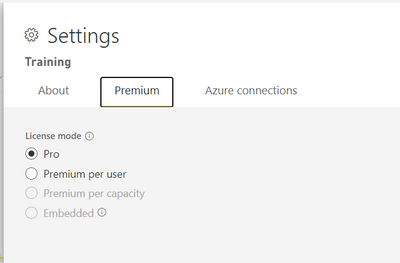
You can go to the "Settings" of the Workspace you created and on the "Premium" tab you can set the Workspace to whatever licence level you have available.

Burningsuit_0-1664196320642.png

If any of these options are greyed out it will be because Power BI does not see the relevant licence, for example my screenshot above does not have "Premium pe Capacity" enabled as I don't have a Premium Capacity licence.

If you don't have the the option availavle, you'll need to investigate if your licence has run out, or been stopped. Best to ask your local Power BI administrator.

Hope this helps

Stuart 


Hi @Burningsuit the problem is that option is disable

sIMONE979
Regular Visitor

Hi, it's not useful for you, but i have the same problem

Helpful resources

Announcements
Power BI DataViz World Championships

Power BI Dataviz World Championships

The Power BI Data Visualization World Championships is back! Get ahead of the game and start preparing now!

December 2025 Power BI Update Carousel

Power BI Monthly Update - December 2025

Check out the December 2025 Power BI Holiday Recap!

FabCon Atlanta 2026 carousel

FabCon Atlanta 2026

Join us at FabCon Atlanta, March 16-20, for the ultimate Fabric, Power BI, AI and SQL community-led event. Save $200 with code FABCOMM.