Get Fabric or SQL Certified for Free.
Get certified for free when you join Fabric Data Days 2026 and dive into Fabric, Power BI, SQL, AI, and other essential data skills.
Join now- Power BI forums
- Get Help with Power BI
- Desktop
- Service
- Report Server
- Power Query
- Mobile Apps
- Developer
- DAX Commands and Tips
- Custom Visuals Development Discussion
- Health and Life Sciences
- Power BI Spanish forums
- Translated Spanish Desktop
- Training and Consulting
- Instructor Led Training
- Dashboard in a Day for Women, by Women
- Galleries
- Data Stories Gallery
- Themes Gallery
- Contests Gallery
- QuickViz Gallery
- Quick Measures Gallery
- Visual Calculations Gallery
- Notebook Gallery
- Translytical Task Flow Gallery
- TMDL Gallery
- R Script Showcase
- Webinars and Video Gallery
- Ideas
- Custom Visuals Ideas (read-only)
- Issues
- Issues
- Events
- Upcoming Events
July 7 - July 17 | Round 2 of the Power BI Dataviz World Championships. Don't miss your chance! Learn more
- Power BI forums
- Forums
- Get Help with Power BI
- Service
- Re: Premium Generation 2 (preview) problems with d...
- Subscribe to RSS Feed
- Mark Topic as New
- Mark Topic as Read
- Float this Topic for Current User
- Bookmark
- Subscribe
- Printer Friendly Page


- Mark as New
- Bookmark
- Subscribe
- Mute
- Subscribe to RSS Feed
- Permalink
- Report Inappropriate Content
Premium Generation 2 (preview) problems with dataflows
Hi Everyone,
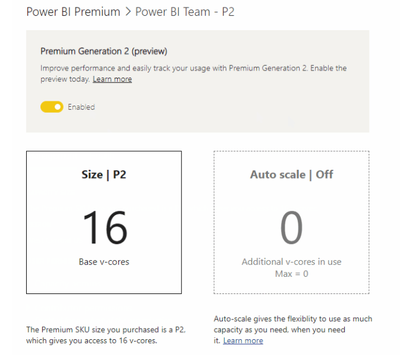
I activated the Power BI Premium G2 in my P1 and my all dataflows stop working. I saw something in "Known limitations in Premium Gen2: Dataflows with ADLS Gen2 data sources are not currently functional on Premium Gen2 capacities."It´s possible to use G2 with dataflow?Can you help me? Can you explain to me?
There was a problem refreshing your dataflowYour INPI dataflow couldn’t be refreshed because there was a problem with one or more entities, or because dataflow capabilities were unavailable. The next refresh for “INPI” is scheduled for November 17, 2020 8:00 UTC. |
Thanks,

- Mark as New
- Bookmark
- Subscribe
- Mute
- Subscribe to RSS Feed
- Permalink
- Report Inappropriate Content
@Anonymousdeativating and switching back on did the trick. Thank you.

- Mark as New
- Bookmark
- Subscribe
- Mute
- Subscribe to RSS Feed
- Permalink
- Report Inappropriate Content
hi @lawrenceabith,
the limitation is gone now. What is Microsoft Power BI Premium? - Power BI | Microsoft Docs
you need to deactivate premium for the workspace where the dataflow sits and then switch it on again. If you dont do that and you do a refresh that fails, the error shows the details now. after that it should work. It did for me.
- Mark as New
- Bookmark
- Subscribe
- Mute
- Subscribe to RSS Feed
- Permalink
- Report Inappropriate Content
We ran into the same issue, had to revert to Gen1 in order to get Dataflows to run. Dataflows are one of the most important features for premium capacities and it is very dissapointing to see such a failure. The error log is too vaugue stating "An error occured refreshing your dataflow". Okay great, maybe give some log detail or something.
- Mark as New
- Bookmark
- Subscribe
- Mute
- Subscribe to RSS Feed
- Permalink
- Report Inappropriate Content
Yes @Anonymous I agree! Our dataflows needs to run in Gen2.
- Mark as New
- Bookmark
- Subscribe
- Mute
- Subscribe to RSS Feed
- Permalink
- Report Inappropriate Content
Hi @v-janeyg-msft ,
I'm not able to see the Workloads section (to change XMLA Read/Write setting) when G2 is enabled. Where would I change this setting with G2 enabled?
Regards,
Ferdinand


- Mark as New
- Bookmark
- Subscribe
- Mute
- Subscribe to RSS Feed
- Permalink
- Report Inappropriate Content
Hi, @lawrenceabith
It’s my pleasure to answer for you.
According to your description, the problem that the dataflows can't be refreshed occurred after upgrading G2.If use P1 can run normally, it is recommended to restore to P1 first, because G2 is still in the preview stage, and there are some limitations or many unsupported functions.
If it doesn’t solve your problem, please feel free to ask me.
Best Regards
Janey Guo
If this post helps, then please consider Accept it as the solution to help the other members find it more quickly.
- Mark as New
- Bookmark
- Subscribe
- Mute
- Subscribe to RSS Feed
- Permalink
- Report Inappropriate Content
Hi @v-janeyg-msft,
I restore to G1 and my dataflows are running well, but do you have plans to work with dataflow in G2?
Thanks,

- Mark as New
- Bookmark
- Subscribe
- Mute
- Subscribe to RSS Feed
- Permalink
- Report Inappropriate Content
This was the same on our premium capacity node. Workloads looked to be limited to Datasets and AI (no reference to Dataflows).
Helpful resources

FabCon & SQLCon – Barcelona 2026
Join us in Barcelona for FabCon and SQLCon, the Fabric, Power BI, SQL, and AI community event. Save €200 with code FABCMTY200.

Data Days 2026
Join Data Days 2026: 60 days of free live/on-demand sessions, challenges, study groups, and certification opportunities.

Power BI DataViz World Championships - June 2026
A new Power BI DataViz World Championship is coming this June! Don't miss out on submitting your entry.

| User | Count |
|---|---|
| 23 | |
| 11 | |
| 10 | |
| 9 | |
| 4 |


| User | Count |
|---|---|
| 32 | |
| 25 | |
| 24 | |
| 22 | |
| 21 |


