Join us in Barcelona for FabCon and SQLCon, September 28 - October 1, 2026.
This is best Fabric, Power BI, SQL and AI community event. How do we know? The last event sold out! Save €200 with code FABCMTY200.
Register now- Power BI forums
- Get Help with Power BI
- Desktop
- Service
- Report Server
- Power Query
- Mobile Apps
- Developer
- DAX Commands and Tips
- Custom Visuals Development Discussion
- Health and Life Sciences
- Power BI Spanish forums
- Translated Spanish Desktop
- Training and Consulting
- Instructor Led Training
- Dashboard in a Day for Women, by Women
- Galleries
- Data Stories Gallery
- Themes Gallery
- Contests Gallery
- QuickViz Gallery
- Quick Measures Gallery
- Visual Calculations Gallery
- Fabric Apps Gallery
- Notebook Gallery
- Translytical Task Flow Gallery
- TMDL Gallery
- R Script Showcase
- Webinars and Video Gallery
- Ideas
- Custom Visuals Ideas (read-only)
- Issues
- Issues
- Events
- Upcoming Events
The Fabric community is upgrading! Read all of the details including the timeline and what you can expect. Learn more
- Power BI forums
- Forums
- Get Help with Power BI
- Service
- PowerShell script for partition refresh
- Subscribe to RSS Feed
- Mark Topic as New
- Mark Topic as Read
- Float this Topic for Current User
- Bookmark
- Subscribe
- Printer Friendly Page

- Mark as New
- Bookmark
- Subscribe
- Mute
- Subscribe to RSS Feed
- Permalink
- Report Inappropriate Content
PowerShell script for partition refresh
I am trying to create a partition refresh using the PowerShell script, when I run the script normally it’s prompting for login credentials. I entered the user id and password Manually then it is working fine but when I am trying to give the password dynamically inside the script then I am facing an error. Here it’s my script & Error.
$TenantId = "TenantID"
$AppId = # Service PRincipal ID
$Secret = " # Secret from Service Principal -
$password = ConvertTo-SecureString $Secret -AsPlainText -Force
$Creds = New-Object System.Management.Automation.PSCredential $AppId, $password
#$password = "password" | ConvertTo-SecureString -asPlainText -Force
$quote1 = '"'
# $Partition= @($Year;$Q;$quater;$Month)
$i =-2
$currentSubtractMonths = [DateTime]::Now.AddMonths($i)
# Run parameters, please specify below parameters
$WorkspaceName = "Enterprise Datasets" #Here it is the workspace name! Not the id!
$DatasetName = "Testing" #Also known as database name
# $TableName = "MyTable" #Table name in the specified dataset
$filename = "NewLog-"+ (Get-Date -Format "MM-dd-yyyy-hh-mm")
$logfile = "D:\zak\Powerbilogs\"+$filename+".log"
# Base variables
$PbiBaseConnection = "powerbi://api.powerbi.com/v1.0/myorg/"
$XmlaEndpoint = $PbiBaseConnection + $WorkspaceName
# Check whether the SQL Server module is installed. If not, it will be installed.
# Install Module (Admin permissions might be required)
$moduleName = Get-Module -ListAvailable -Verbose:$false | Where-Object { $_.Name -eq "SqlServer" } | Select-Object -ExpandProperty Name;
if ([string]::IsNullOrEmpty($moduleName)) {
Write-Host -ForegroundColor White "==============================================================================";
Write-Host -ForegroundColor White "Install module SqlServer...";
Install-Module SqlServer -RequiredVersion 21.1.18230 -Scope CurrentUser -SkipPublisherCheck -AllowClobber -Force
# Check for the latest version this documentation: https://www.powershellgallery.com/packages/SqlServer/
Write-Host -ForegroundColor White "==============================================================================";
}
for($i=-2; $i -lt 1; $i++)
{
$currentSubtractMonths = [DateTime]::Now.AddMonths($i)
$Year = Get-Date $currentSubtractMonths -format "yyyy"
$quater = [math]::Ceiling(($currentSubtractMonths).Month/3)
$Month = Get-Date $currentSubtractMonths -format "MM"
$Q = "Q"
$Partition= @($quote1;$Year;$Q;$quater;$Month;$quote1)
$partition_updated = $Partition -join ''
$partition_updated
# TMSL Script
$TmslScript =
@"
{
"refresh": {
"type": "full",
"objects": [
{
"database": "Testing",
"table": "SLA Transaction Summary Import",
"partition": $partition_updated
}
]
}
}
"@
# Execute refresh trigger on specified table
Try {
# Invoke-ASCmd -Credential $myCred
# Invoke-ASCmd -Credential $Creds -TenantId $TenantId -Query $TmslScript -Server: $XmlaEndpoint -Database $DatasetName
Invoke-ASCmd -Credential $Creds -ServicePrincipal -ApplicationId $AppId -Tenant $TenantId -Query $TmslScript -Server: $XmlaEndpoint -Database $Databasename
#Connect-PowerBIServiceAccount -Credential $Creds
Write message if succeeded
Write-Host "Table" $TableName "in dataset" $DatasetName "successfully triggered to refresh" -ForegroundColor Green
}
# try{
#$URI = "https://api.powerbi.com/v1.0/myorg/groups/" + $WorkspaceName + "/datasets/" + $DatasetName + "/refreshes"
#Connect-PowerBIServiceAccount -ServicePrincipal -Credential $Creds
#$Results = Invoke-PowerBIRestMethod -Url $URI -Method Get | Credential -$Creds
#}
Catch{
$exception = $_.Exception.Message
$Status="Dataset Refresh Failed"
Out-File -FilePath $logfile -Append -InputObject $Status
Out-File -FilePath $logfile -Append -InputObject $exception
Write-Host "Dataset has failed, Please check the log file."
}
}
Error
Invoke-ASCmd : Unable to obtain authentication token using the credentials provided. If your Active Directory tenant administrator has configured Multi-Factor Authentication or if your account is a
Microsoft Account, please remove the user name and password from the connection string, and then retry. You should then be prompted to enter your credentials
Solved! Go to Solution.
- Mark as New
- Bookmark
- Subscribe
- Mute
- Subscribe to RSS Feed
- Permalink
- Report Inappropriate Content
I have found the solution I just missed to create the security groups in Azure and added that to power Bi Admin portal (developer settings )
- Mark as New
- Bookmark
- Subscribe
- Mute
- Subscribe to RSS Feed
- Permalink
- Report Inappropriate Content
I have found the solution I just missed to create the security groups in Azure and added that to power Bi Admin portal (developer settings )


- Mark as New
- Bookmark
- Subscribe
- Mute
- Subscribe to RSS Feed
- Permalink
- Report Inappropriate Content
Sounds like you are running this outside of an AAD context? I have no experience for such a scenario.
- Mark as New
- Bookmark
- Subscribe
- Mute
- Subscribe to RSS Feed
- Permalink
- Report Inappropriate Content
You may want to reformulate your question. This is not an issue with partition refresh, it is an issue getting the auth token. (there is one more hurdle - you need to get a token that has the right scope).
How have you configured your Azure app registration?
- Mark as New
- Bookmark
- Subscribe
- Mute
- Subscribe to RSS Feed
- Permalink
- Report Inappropriate Content
Yes i have configured your Azure app registration.. can tell me more about the auth token and where i can find it ?
- Mark as New
- Bookmark
- Subscribe
- Mute
- Subscribe to RSS Feed
- Permalink
- Report Inappropriate Content
function GetAuthToken
{
    if(-not (Get-Module AzureRm.Profile)) {    Import-Module AzureRm.Profile    }
    $clientId = "<your app id>"
    $redirectUri = "urn:ietf:wg:oauth:2.0:oob"
    $resourceAppIdURI = "https://analysis.windows.net/powerbi/api"
    $authority = "https://login.microsoftonline.com/common/oauth2/authorize";
    $authContext = New-Object "Microsoft.IdentityModel.Clients.ActiveDirectory.AuthenticationContext" -ArgumentList $authority
    $authResult = $authContext.AcquireToken($resourceAppIdURI, $clientId, $redirectUri, "Auto")
    return $authResult
}

# Get the auth token from AAD
$token = GetAuthToken

# Building Rest API header with authorization token
$authHeader = @{
    'Content-Type'='application/json'
    'Authorization'=$token.CreateAuthorizationHeader()
}
once you have that you can use it in the auth header for your refresh requests. Use jwt.io to validate that the token has the right scope.
- Mark as New
- Bookmark
- Subscribe
- Mute
- Subscribe to RSS Feed
- Permalink
- Report Inappropriate Content
I tried to run the script.. after chaning the Client id but i am getting this error
AADSTS650057: Invalid resource. The client has requested access to a resource which is not listed in the requested permissions in the client's application registration. Client app ID: 4ac1f38e-ab66-474e-99c6-8d3dcce7be55(Test10). Resource value from request: https://analysis.windows.net/powerbi/api. Resource app ID: 00000009-0000-0000-c000-000000000000. List of valid resources from app registration: 00000003-0000-0000-c000-000000000000
- Mark as New
- Bookmark
- Subscribe
- Mute
- Subscribe to RSS Feed
- Permalink
- Report Inappropriate Content
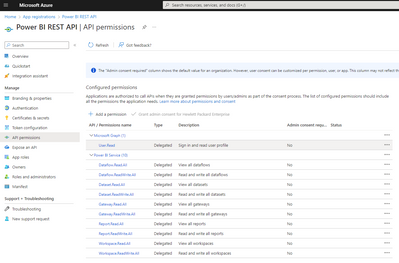
As I mentioned above it looks like your app registration doesn't have the required scope.
- Mark as New
- Bookmark
- Subscribe
- Mute
- Subscribe to RSS Feed
- Permalink
- Report Inappropriate Content
can you please tell me how we can add required scope i am completely lost...
- Mark as New
- Bookmark
- Subscribe
- Mute
- Subscribe to RSS Feed
- Permalink
- Report Inappropriate Content
Here is an example of how this looks like for one of my apps on the Azure portal
- Mark as New
- Bookmark
- Subscribe
- Mute
- Subscribe to RSS Feed
- Permalink
- Report Inappropriate Content
I found the mistake i have entered the wrong client ID in the Script and i changed the client ID but i got this error
Request Id: 3f2acdcd-8450-47e2-9cbe-0870e5349d02
Correlation Id: 563929ef-e6b1-45e7-ba08-ba4a5c984bee
Timestamp: 2022-12-13T05:03:04Z
Message: AADSTS500113: No reply address is registered for the application.
- Mark as New
- Bookmark
- Subscribe
- Mute
- Subscribe to RSS Feed
- Permalink
- Report Inappropriate Content
Redo your app registration and supply the correct callback URLs
- Mark as New
- Bookmark
- Subscribe
- Mute
- Subscribe to RSS Feed
- Permalink
- Report Inappropriate Content
I changed the call back url and run the code
this is the code
function GetAuthToken
{
if(-not (Get-Module AzureRm.Profile)) { Import-Module AzureRm.Profile }
$clientId = "Clientid"
$redirectUri = "https://login.microsoftonline.com/wdc.com/oauth2/token"
$resourceAppIdURI = "https://analysis.windows.net/powerbi/api"
$authority = "https://login.microsoftonline.com/common/oauth2/authorize";
$authContext = New-Object "Microsoft.IdentityModel.Clients.ActiveDirectory.AuthenticationContext" -ArgumentList $authority
$authResult = $authContext.AcquireToken($resourceAppIdURI, $clientId, $redirectUri, "Auto")
return $authResult
}
# Get the auth token from AAD
$token = GetAuthToken
# Building Rest API header with authorization token
$authHeader = @{
'Content-Type'='application/json'
'Authorization'=$token.CreateAuthorizationHeader()
}
and I got this error
Exception calling "AcquireToken" with "4" argument(s): "AADSTS7000218: The request body must contain the following parameter: 'client_assertion' or 'client_secret'.
Trace ID: f9b90e2e-c397-4c56-87e1-e2e6e2de1200
Correlation ID: 3188f0b4-2ded-478f-a08c-b07f0ffab4c8
Timestamp: 2022-12-14 04:53:53Z
and then i changed the code like this
function GetAuthToken
{
if(-not (Get-Module AzureRm.Profile)) { Import-Module AzureRm.Profile }
$clientId = "clientId "
$clientsecret = "clientsecret " | ConvertTo-SecureString -asPlainText -Force
$redirectUri = "https://login.microsoftonline.com/wdc.com/oauth2/token"
$resourceAppIdURI = "https://analysis.windows.net/powerbi/api"
$authority = "https://login.microsoftonline.com/common/oauth2/authorize";
$authContext = New-Object "Microsoft.IdentityModel.Clients.ActiveDirectory.AuthenticationContext" -ArgumentList $authority
$authResult = $authContext.AcquireToken($resourceAppIdURI, $clientId, $redirectUri,$clientsecret, "Auto")
return $authResult
}
# Get the auth token from AAD
$token = GetAuthToken
# Building Rest API header with authorization token
$authHeader = @{
'Content-Type'='application/json'
'Authorization'=$token.CreateAuthorizationHeader()
}
and I got this error
Cannot find an overload for "AcquireToken" and the argument count: "5".
I am not sure what to do next Kindly let me know what to do
Helpful resources

FabCon & SQLCon – Barcelona 2026
Join us in Barcelona for FabCon and SQLCon, the Fabric, Power BI, SQL, and AI community event. Save €200 with code FABCMTY200.

Power BI DataViz World Championships - June 2026
A new Power BI DataViz World Championship is coming this June! Don't miss out on submitting your entry.

| User | Count |
|---|---|
| 14 | |
| 11 | |
| 9 | |
| 7 | |
| 5 |


