This time we’re going bigger than ever. Fabric, Power BI, SQL, AI and more. We're covering it all. You won't want to miss it.
Learn moreDid you hear? There's a new SQL AI Developer certification (DP-800). Start preparing now and be one of the first to get certified. Register now
Hi
Im experincing some weird problems regarding one of our reports.
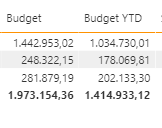
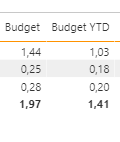
When uploading the report to the PowerBi service, the format of the measures changes. Have you experienced anything like this
PowerBI Desktop
PowerBI service
Solved! Go to Solution.
Just a quick followup, I ended up doing the report agin.
Hi
Thank you for your suggestions.
Ive tried to clear cache, and restore to default. When I upload the report, the format is correct. However first time it updates, it will change the format again. I have even tried to make a new work space, but it is still the same. I think I will try to create a support ticket, too see if MS can help.
@CJensen - Usually when I see something like this it turns out to be that resetting the report to default fixes the issue. I have also seen problems like this when regional language settings are out of sync between browser and desktop (definitely not your case).
You could check the Issues forum here:
https://community.powerbi.com/t5/Issues/idb-p/Issues
And if it is not there, then you could post it.
If you have Pro account you could try to open a support ticket. If you have a Pro account it is free. Go to https://support.powerbi.com. Scroll down and click "CREATE SUPPORT TICKET".
Check out the April 2026 Power BI update to learn about new features.
Sign up to receive a private message when registration opens and key events begin.
If you have recently started exploring Fabric, we'd love to hear how it's going. Your feedback can help with product improvements.
| User | Count |
|---|---|
| 10 | |
| 8 | |
| 8 | |
| 8 | |
| 7 |
| User | Count |
|---|---|
| 49 | |
| 27 | |
| 24 | |
| 20 | |
| 20 |