Join us at FabCon Atlanta from March 16 - 20, 2026, for the ultimate Fabric, Power BI, AI and SQL community-led event. Save $200 with code FABCOMM.
Register now!The Power BI Data Visualization World Championships is back! It's time to submit your entry. Live now!
Where can I see the requests made to our PowerBI reports and their HTTP status codes?
Solved! Go to Solution.
Hi @HulstB ,
As a Power BI service admin, you can analyze usage for all Power BI resources at the tenant level by using custom reports based on the Power BI activity log. You can download the activities by using a REST API or PowerShell cmdlet.
For details, please refer to this document: Track user activities in Power BI.
I tested the PowerShell method:
1. If you don't installed the Power BI Management cmdlets locally, please install it first.
Install-Module -Name MicrosoftPowerBIMgmt
Or, update it:
Update-Module -Name MicrosoftPowerBIMgmt
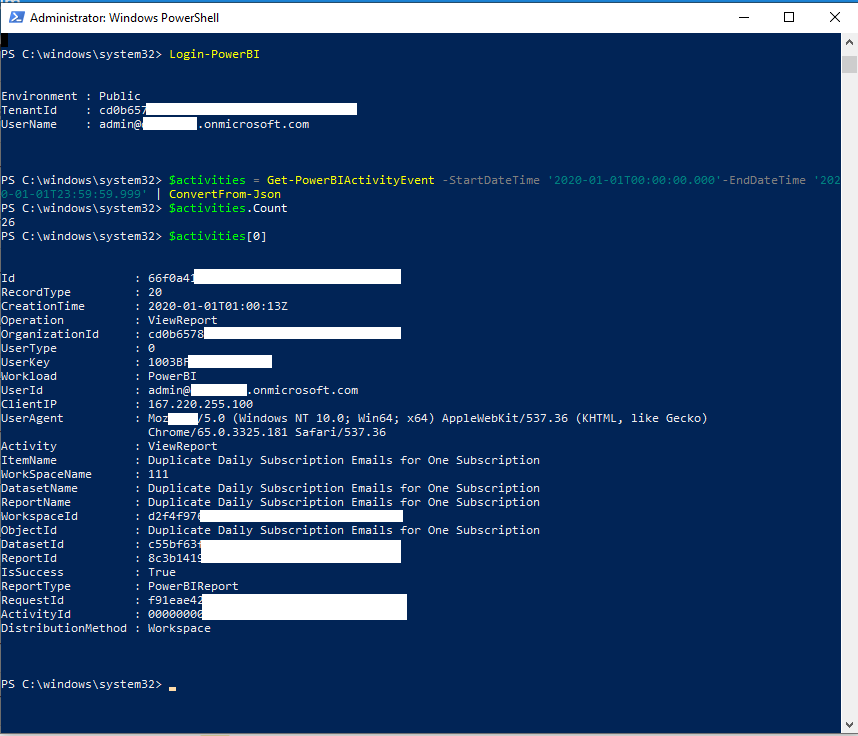
2. Get Power BI activity log.
Login-PowerBI
$activities = Get-PowerBIActivityEvent -StartDateTime '2020-01-01T00:00:00.000'-EndDateTime '2020-01-01T23:59:59.999' | ConvertFrom-Json
$activities.Count
$activities[0]
Best Regards,
Icey
If this post helps, then please consider Accept it as the solution to help the other members find it more quickly.
Hi @HulstB ,
As a Power BI service admin, you can analyze usage for all Power BI resources at the tenant level by using custom reports based on the Power BI activity log. You can download the activities by using a REST API or PowerShell cmdlet.
For details, please refer to this document: Track user activities in Power BI.
I tested the PowerShell method:
1. If you don't installed the Power BI Management cmdlets locally, please install it first.
Install-Module -Name MicrosoftPowerBIMgmt
Or, update it:
Update-Module -Name MicrosoftPowerBIMgmt
2. Get Power BI activity log.
Login-PowerBI
$activities = Get-PowerBIActivityEvent -StartDateTime '2020-01-01T00:00:00.000'-EndDateTime '2020-01-01T23:59:59.999' | ConvertFrom-Json
$activities.Count
$activities[0]
Best Regards,
Icey
If this post helps, then please consider Accept it as the solution to help the other members find it more quickly.
Hi
Thank you.
I am trying to use the rest api but getting error "403Forbidden".
I am using the basic authentication with username/password. The user has "Power BI admin" role.
Do you know why this error is coming?
Thanks
Naresh
This is very usefull, especially with the example output. I will try it out. Thanks.
The Power BI Data Visualization World Championships is back! It's time to submit your entry.
Check out the January 2026 Power BI update to learn about new features.
| User | Count |
|---|---|
| 22 | |
| 13 | |
| 10 | |
| 9 | |
| 8 |
| User | Count |
|---|---|
| 51 | |
| 37 | |
| 29 | |
| 27 | |
| 18 |