Don't miss your chance to take the Fabric Data Engineer (DP-700) exam on us!
Learn moreNext up in the FabCon + SQLCon recap series: The roadmap for Microsoft SQL and Maximizing Developer experiences in Fabric. All sessions are available on-demand after the live show. Register now
Hi People
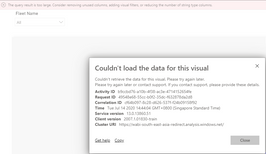
I'm encountering this error while displaying my visual. Seems like error show only when I do select all.
Maybe my DAX measures are too much for system to handle it. Any other way to code the dax below? I'm using date intelligent for KPI.
Measure 1
Hi @Anonymous
As the info prompted in the tab header, "The query is too large, consider removing unused columns, add visual filters, or reducing the number of string type columns."
Please check Note of this article:If a table has too many values, consider converting it to a matrix and/or using drilldown. The maximum data points a table will display is 3,500.Here are some tips about Power BI performance for your reference.
I'd suggest creating views of the SQL Server tables used in the report. The views restricted the number of rows and columns considerably. We can used these views as the datasources for the report and it refreshes online without any issues.
If you have recently started exploring Fabric, we'd love to hear how it's going. Your feedback can help with product improvements.
A new Power BI DataViz World Championship is coming this June! Don't miss out on submitting your entry.
Share feedback directly with Fabric product managers, participate in targeted research studies and influence the Fabric roadmap.