Get Fabric or SQL Certified for Free.
Get certified for free when you join Fabric Data Days 2026 and dive into Fabric, Power BI, SQL, AI, and other essential data skills.
Join now- Power BI forums
- Get Help with Power BI
- Desktop
- Service
- Report Server
- Power Query
- Mobile Apps
- Developer
- DAX Commands and Tips
- Custom Visuals Development Discussion
- Health and Life Sciences
- Power BI Spanish forums
- Translated Spanish Desktop
- Training and Consulting
- Instructor Led Training
- Dashboard in a Day for Women, by Women
- Galleries
- Data Stories Gallery
- Themes Gallery
- Contests Gallery
- QuickViz Gallery
- Quick Measures Gallery
- Visual Calculations Gallery
- Fabric Apps Gallery
- Notebook Gallery
- Translytical Task Flow Gallery
- TMDL Gallery
- R Script Showcase
- Webinars and Video Gallery
- Ideas
- Custom Visuals Ideas (read-only)
- Issues
- Issues
- Events
- Upcoming Events
July 7 - July 17 | Round 2 of the Power BI Dataviz World Championships. Don't miss your chance! Learn more
- Power BI forums
- Forums
- Get Help with Power BI
- Service
- Re: PowerBI RLS
- Subscribe to RSS Feed
- Mark Topic as New
- Mark Topic as Read
- Float this Topic for Current User
- Bookmark
- Subscribe
- Printer Friendly Page

- Mark as New
- Bookmark
- Subscribe
- Mute
- Subscribe to RSS Feed
- Permalink
- Report Inappropriate Content
PowerBI RLS
Hi All,
I am new to PowerBI
I have an table with data like [email protected],[email protected],[email protected] in EmailAddress column.
I have created a Role in RLS using Username() function like [EmailAddress]=Username().
But while testing the Role in PowerBI Desktop by passing one emailaddress I am not getting the result as expected.
If I pass all the 3 EmailAddress then it is working fine.
Please kindly help me on this is there any function so I can handle this comma seperated data instead of split.
- Mark as New
- Bookmark
- Subscribe
- Mute
- Subscribe to RSS Feed
- Permalink
- Report Inappropriate Content
Hi All,
I am new to PowerBI
I have an table with data like [email protected],[email protected] in single cell,I have used Username() function in RLS like [Email]=username().
While Testing the Role in PowerBI Desktop I have passed one of the Email Address like [email protected] I am not getting the expected output . PowerBI is expecting me to pass both the Email address.
kindly please help me on this issue how to get data from comma seperated data is there any function to do that.


- Mark as New
- Bookmark
- Subscribe
- Mute
- Subscribe to RSS Feed
- Permalink
- Report Inappropriate Content
You want SEARCH or FIND
https://msdn.microsoft.com/en-us/query-bi/dax/search-function-dax
Follow on LinkedIn
@ me in replies or I'll lose your thread!!!
Instead of a Kudo, please vote for this idea
Become an expert!: Enterprise DNA
External Tools: MSHGQM
YouTube Channel!: Microsoft Hates Greg
Latest book!: DAX For Humans
DAX is easy, CALCULATE makes DAX hard...
- Mark as New
- Bookmark
- Subscribe
- Mute
- Subscribe to RSS Feed
- Permalink
- Report Inappropriate Content
I wanted DAX to find the EmailAddress of the logged in user from the comma seperated data.
- Mark as New
- Bookmark
- Subscribe
- Mute
- Subscribe to RSS Feed
- Permalink
- Report Inappropriate Content
Right, I think the tricky part will be getting this to work with RLS but I would think that something like this would work:
SEARCH(USERNAME(),[EmailAddress],0,-1)>0
Follow on LinkedIn
@ me in replies or I'll lose your thread!!!
Instead of a Kudo, please vote for this idea
Become an expert!: Enterprise DNA
External Tools: MSHGQM
YouTube Channel!: Microsoft Hates Greg
Latest book!: DAX For Humans
DAX is easy, CALCULATE makes DAX hard...
- Mark as New
- Bookmark
- Subscribe
- Mute
- Subscribe to RSS Feed
- Permalink
- Report Inappropriate Content
Hi Greg,
Is there any way so I can iterate through comma seperated data.
I wanted a funtion that iterates through my comma seperated data and when I login with an specific user it needs to filter the roles assigned to the user accordingly.
For eg: I am having data like [email protected],[email protected] in single cell.
Can You please help me on this.
- Mark as New
- Bookmark
- Subscribe
- Mute
- Subscribe to RSS Feed
- Permalink
- Report Inappropriate Content
Hi Greg,
Thanks for the Reply.
I have used the query given by you to create an Role in RLS.
But I am getting error as attached.
Feedback Type:
Frown (Error)

Timestamp:
2018-04-04T11:22:58.5689871Z

Local Time:
2018-04-04T16:52:58.5689871+05:30

Session ID:
1c62272f-fc9a-4269-9dd2-9cca07e8f9a5

Release:
March 2018

Product Version:
2.56.5023.942 (PBIDesktop) (x64)

Error Message:
An error was encountered during the evaluation of the row level security expression defined on table 'UserDetail'. Error message: Row level security expression defined for the table 'UserDetail' is not of type True/False.

OS Version:
Microsoft Windows NT 10.0.16299.0 (x64 en-US)

CLR Version:
4.7 or later [Release Number = 461308]

Peak Virtual Memory:
34.2 GB

Private Memory:
528 MB

Peak Working Set:
619 MB

IE Version:
11.251.16299.0

User ID:
14338ea1-fde3-4a54-ae82-5696d42acadc

Workbook Package Info:
1* - en-IN, Query Groups: 0, fastCombine: Disabled, runBackgroundAnalysis: True.

Telemetry Enabled:
True

Model Default Mode:
Import

Snapshot Trace Logs:
C:\Users\HP 240 G6\AppData\Local\Microsoft\Power BI Desktop\FrownSnapShot1300755002.zip

Performance Trace Logs:
C:\Users\HP 240 G6\AppData\Local\Microsoft\Power BI Desktop\PerformanceTraces.zip

Disabled Preview Features:
PBI_shapeMapVisualEnabled
PBI_EnableReportTheme
PBI_numericSlicerEnabled
PBI_SpanishLinguisticsEnabled
CustomConnectors
PBI_AdobeAnalytics
PBI_qnaExplore
PBI_variationUIChange
PBI_customVisualsGallery
PBI_canvasTooltips

Disabled DirectQuery Options:
PBI_DirectQuery_Unrestricted
TreatHanaAsRelationalSource

Cloud:
GlobalCloud

DPI Scale:
100%

Supported Services:
Power BI

Formulas:


section Section1;

shared UserDetail = let
    Source = Sql.Database(".", "Test", [Query="SELECT DISTINCT ud.vendorcode,#(lf)  STUFF((SELECT distinct ',' + p1.emailaddress#(lf)         FROM bak_userdetail p1#(lf)         WHERE ud.vendorcode = p1.vendorcode#(lf)            FOR XML PATH(''), TYPE#(lf)            ).value('.', 'NVARCHAR(MAX)')#(lf)        ,1,1,'') email#(lf)FROM bak_userdetail ud;"]),
    #"Added Custom" = Table.AddColumn(Source, "Emailsearch", each [email]),
    #"Removed Columns" = Table.RemoveColumns(#"Added Custom",{"Emailsearch"}),
    #"Added Index" = Table.AddIndexColumn(#"Removed Columns", "Index", 0, 1),
    #"Removed Columns1" = Table.RemoveColumns(#"Added Index",{"Index"})
in
    #"Removed Columns1";

shared Vehicle = let
    Source = Sql.Database(".", "Test", [Query="select * from vehicle"])
in
    Source;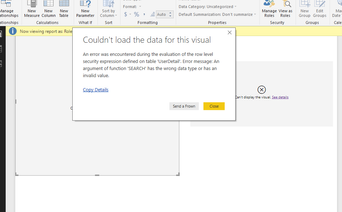
- Mark as New
- Bookmark
- Subscribe
- Mute
- Subscribe to RSS Feed
- Permalink
- Report Inappropriate Content
That's what I was afraid of. Perhaps try this:
IF(SEARCH(USERNAME(),[EmailAddress],0,-1)=-1,FALSE(),TRUE())
Follow on LinkedIn
@ me in replies or I'll lose your thread!!!
Instead of a Kudo, please vote for this idea
Become an expert!: Enterprise DNA
External Tools: MSHGQM
YouTube Channel!: Microsoft Hates Greg
Latest book!: DAX For Humans
DAX is easy, CALCULATE makes DAX hard...
- Mark as New
- Bookmark
- Subscribe
- Mute
- Subscribe to RSS Feed
- Permalink
- Report Inappropriate Content
Hi Greg,
Thank for the reply.
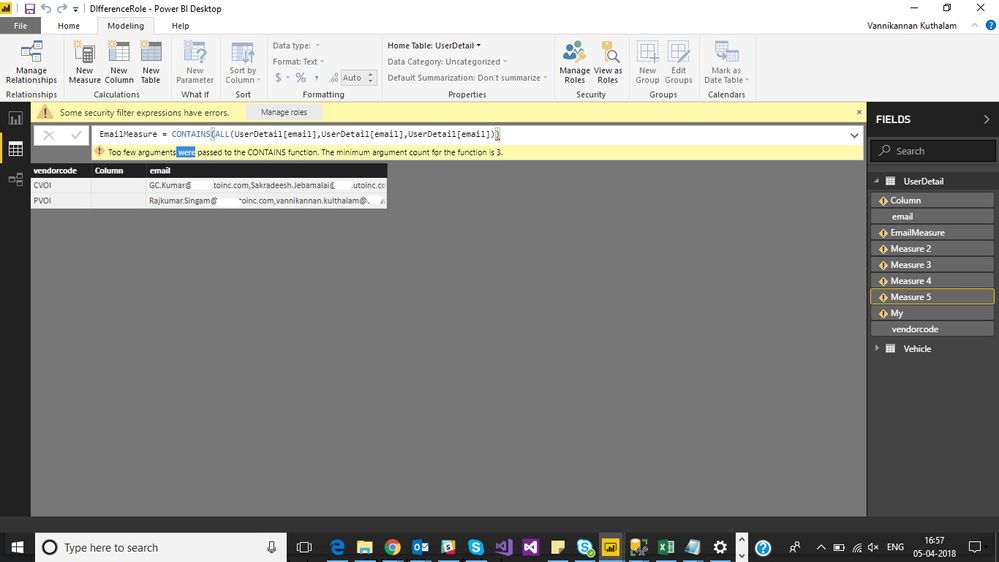
I have used the query given by you but I am getting the same error.
I have directly used the query in RLS for creating role.
Do we have any option to list the comma seperated data in power bi.
Is there any alternate solution to handle the data
Please help me on this.
Thanks


- Mark as New
- Bookmark
- Subscribe
- Mute
- Subscribe to RSS Feed
- Permalink
- Report Inappropriate Content
I would suggest splitting the data into multiple rows. In doing it in this way it will easily work using RLS
- Mark as New
- Bookmark
- Subscribe
- Mute
- Subscribe to RSS Feed
- Permalink
- Report Inappropriate Content
Hi,
Thanks for reply.
I have three roles for example RoleA,RoleB,RoleC.
Under RoleA there are 2000 Users.
Under RoleB there are 10,000 Users.
And Under RoleC there are 15,000 Users.
So if I split the data it will be the tedious process Right.
Is there any other way to handle Comma seperated data.
Thank You.
- Mark as New
- Bookmark
- Subscribe
- Mute
- Subscribe to RSS Feed
- Permalink
- Report Inappropriate Content
HI @Anonymous,
In fact, even if you achieve dynamic RLS based on username, you still need to assign roles to users.
AFAIK, current power bi not support contains batch methods. so I'd like to suggest you submit an idea for add powershell support to assign roles.
Regards,
Xiaoxin Sheng
Helpful resources

FabCon & SQLCon – Barcelona 2026
Join us in Barcelona for FabCon and SQLCon, the Fabric, Power BI, SQL, and AI community event. Save €200 with code FABCMTY200.

Data Days 2026
Join Data Days 2026: 60 days of free live/on-demand sessions, challenges, study groups, and certification opportunities.

Power BI DataViz World Championships - June 2026
A new Power BI DataViz World Championship is coming this June! Don't miss out on submitting your entry.

| User | Count |
|---|---|
| 24 | |
| 10 | |
| 9 | |
| 6 | |
| 5 |


