This time we’re going bigger than ever. Fabric, Power BI, SQL, AI and more. We're covering it all. You won't want to miss it.
Learn moreDid you hear? There's a new SQL AI Developer certification (DP-800). Start preparing now and be one of the first to get certified. Register now
Hi,
I am trying to create a button in a PowerBI Report that will trigger a PowerAutomate process.
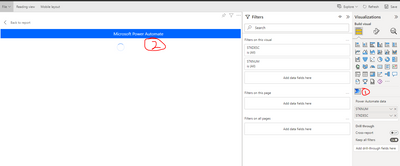
First, I installed PowerAutomate in the Visualizations pane.
Then, I clicked on it and tried to "Edit" the PowerAutomate Visualization.
Then, it is stuck spinning.
Any idea how to fix this?
dchan
Solved! Go to Solution.
Not sure if there are explicit restrictions applied in your environment then which might be preventing this.
These are the only limitations that are known.
Check this link:
https://community.powerbi.com/t5/Desktop/Power-automate-visual-edit-mode-not-working/td-p/2005974
With government account power automate visual doesn't work.
Hope this helps.
Hi @dc7669
Try to update your desktop
Regards
Amine Jerbi
If I answered your question, please mark this thread as accepted
and you can follow me on
My Website, LinkedIn and Facebook
Hi @dc7669
Please can you try following instructions as per the below link:
https://learn.microsoft.com/en-us/power-automate/trigger-flow-powerbi-report
I have added automate button in powerbi report in similar manner and they work. You might have to delete this button and add it again.
Hi,
I tried that, but it did not work.
I am in a government environment. I don't know if it matters.
dchan
Not sure if there are explicit restrictions applied in your environment then which might be preventing this.
These are the only limitations that are known.
Check this link:
https://community.powerbi.com/t5/Desktop/Power-automate-visual-edit-mode-not-working/td-p/2005974
With government account power automate visual doesn't work.
Hope this helps.
Check out the April 2026 Power BI update to learn about new features.
Sign up to receive a private message when registration opens and key events begin.
If you have recently started exploring Fabric, we'd love to hear how it's going. Your feedback can help with product improvements.
| User | Count |
|---|---|
| 10 | |
| 8 | |
| 7 | |
| 7 | |
| 7 |
| User | Count |
|---|---|
| 49 | |
| 27 | |
| 21 | |
| 20 | |
| 20 |