cancel
Showing results for 
Search instead for 
Did you mean: 

Vote for your favorite vizzies from the Power BI Dataviz World Championship submissions. Vote now!

Reply
UrbanOffload
Regular Visitor

Power BI

Hi All,


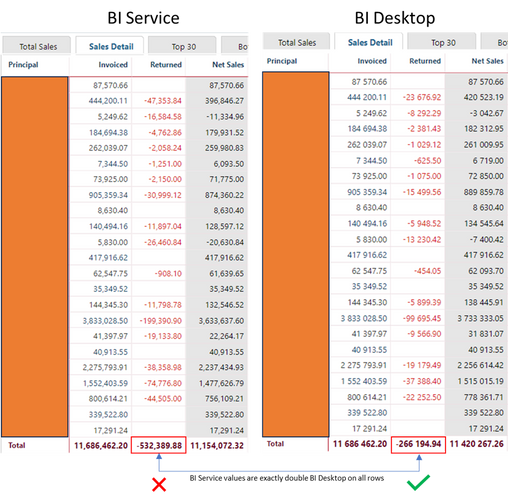
Regarding Power BI Service vs Desktop. The same dataset, freshly published, returns different results for the same date period. Please look at the image below. The Returns column in Power BI Service is showing values which are exactly double the value of those shown in the Power BI Desktop report. The Desktop report is correct. This only occurs on the "Returns" column. All other report values are correct.


UrbanOffload_1-1694566887290.png


If someone can point me in the right direction it would be highly appreciated.

1 ACCEPTED SOLUTION
Anonymous
Not applicable

Hi  @UrbanOffload ,


You can check the following points:

1. Whether your formula used Now () and other functions, Power BI service time display and Power BI Desktop time display is different, Power BI Desktop time set by the local computer in the system time to determine the time of the Power BI service time based on the time zone of the location of the data, so it may cause different data.


2. If there is a Boolean data type in your dataset, it may cause this to happen. You can modify the Power BI filter to solve it,

Reports doesn’t show data in Power BI Web service after refresh – Issue with True/False values (c-sh...

After a scheduled refresh the report has no data - Page 2 - Microsoft Power BI Community


3. Possibly related to the date:

Solved: Power BI Service - Data Missing after refresh - Microsoft Power BI Community


4. Is the gateway the latest version, if not, please upgrade to the latest version.

Update an on-premises data gateway | Microsoft Learn


Best Regards,

Liu Yang

If this post helps, then please consider Accept it as the solution to help the other members find it more quickly.

View solution in original post

2 REPLIES 2
Anonymous
Not applicable

Hi  @UrbanOffload ,


You can check the following points:

1. Whether your formula used Now () and other functions, Power BI service time display and Power BI Desktop time display is different, Power BI Desktop time set by the local computer in the system time to determine the time of the Power BI service time based on the time zone of the location of the data, so it may cause different data.


2. If there is a Boolean data type in your dataset, it may cause this to happen. You can modify the Power BI filter to solve it,

Reports doesn’t show data in Power BI Web service after refresh – Issue with True/False values (c-sh...

After a scheduled refresh the report has no data - Page 2 - Microsoft Power BI Community


3. Possibly related to the date:

Solved: Power BI Service - Data Missing after refresh - Microsoft Power BI Community


4. Is the gateway the latest version, if not, please upgrade to the latest version.

Update an on-premises data gateway | Microsoft Learn


Best Regards,

Liu Yang

If this post helps, then please consider Accept it as the solution to help the other members find it more quickly.

ChiragGarg2512
Solution Sage
Solution Sage

This something that shouldn't happen and it is difficult to understand the problem from the above statement alone. If possible share a sample data.

Helpful resources

Announcements
Power BI DataViz World Championships

Power BI Dataviz World Championships

Vote for your favorite vizzies from the Power BI World Championship submissions!

Sticker Challenge 2026 Carousel

Join our Community Sticker Challenge 2026

If you love stickers, then you will definitely want to check out our Community Sticker Challenge!

January Power BI Update Carousel

Power BI Monthly Update - January 2026

Check out the January 2026 Power BI update to learn about new features.

FabCon Atlanta 2026 carousel

FabCon Atlanta 2026

Join us at FabCon Atlanta, March 16-20, for the ultimate Fabric, Power BI, AI and SQL community-led event. Save $200 with code FABCOMM.