cancel
Showing results for 
Search instead for 
Did you mean: 

July 7 - July 17 | Round 2 of the Power BI Dataviz World Championships. Don't miss your chance! Learn more

Reply
dsoeker
New Member

Power BI Web - SQL Table Row Limit?

I'm doing some testing with getting the refresh function to work in the web app. I have 3 dashboards each connecting to SQL server tables:


Dashboard 1 - Data table has 27 million rows (550mb file)

Dashboard 2 - Data table has 1.5 million rows (43mb file)

Dashboard 3 - Data table has 600k rows (25mb file)


Dashboards 1 & 2 refresh just fine in the desktop client, but will not in the web app. Meanwhile, dashboard 3 updates just fine in desktop and web. That said, is there a limit to the number of rows in the SQL table that can be imported to the web app?


Thanks!

1 ACCEPTED SOLUTION

@Anonymous It turns out the gateway was not the issue. Everything, as far as the importing of data is concerned, is totally fine. I found that some of the filters my colleague created on the dashboard are failing, making this an entirely different issue. Thanks for your help.


View solution in original post

5 REPLIES 5
Anonymous
Not applicable

@dsoeker Are you using Direct Query? There is a 1 million row restriction. It will work if you aggregate that data, but not pull it straight. It sounds like this corresponds to your testing.

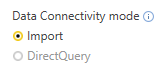
@Anonymous When creating the dashboards in the desktop client, we've always set the 'Data Connectivity Mode' option to import - see below.


Data Connection.PNG


Are you saying there's a 1 million row limit regardless or just for Direct Query?

Anonymous
Not applicable

@dsoeker My understanding is that it should only be on the DQ side. There could be a timeout issue. Have you checked your gateway logs?

Here is the general troubleshooting guide, but there are links on the bottom related to which gateway you are using, you can dig into the logs to see if there are issues.

@Anonymous It turns out the gateway was not the issue. Everything, as far as the importing of data is concerned, is totally fine. I found that some of the filters my colleague created on the dashboard are failing, making this an entirely different issue. Thanks for your help.


@Anonymous the gateway logs don't have any errors in the event viewer. Is there another place I could look?

Helpful resources

Announcements
FabCon and SQLCon Barcelona 2026

FabCon & SQLCon – Barcelona 2026

Join us in Barcelona for FabCon and SQLCon, the Fabric, Power BI, SQL, and AI community event. Save €200 with code FABCMTY200.

60 days of Data Days Carousel

Data Days 2026

Join Fabric Data Days 2026: 60 days of free live/on-demand sessions, challenges, study groups, and certification opportunities.

Power BI DataViz World Championships carousel

Power BI DataViz World Championships - June 2026

A new Power BI DataViz World Championship is coming this June! Don't miss out on submitting your entry.