cancel
Showing results for 
Search instead for 
Did you mean: 

Get Fabric Certified for FREE during Fabric Data Days. Don't miss your chance! Request now

Reply
Anonymous
Not applicable

Power BI Service Refresh Issue - Azure SQL Server

Timeout setting on Power BI DesktopTimeout setting on Power BI Desktop


Hi Community,


I have a power BI report which is using 'import' mode on data from Azure SQL database.

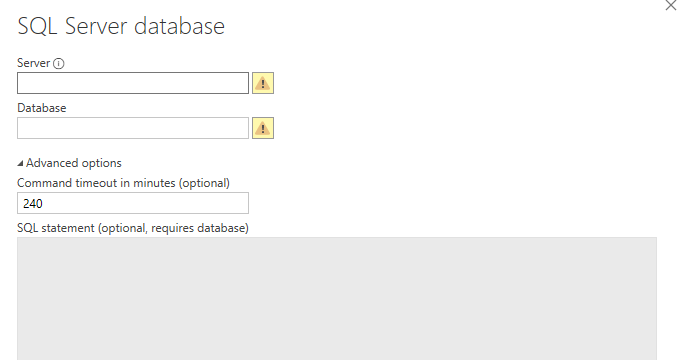
I understand that there's a new feature released not too long ago, where user is able to set the 'command timeout (in minutes)' in Power BI Desktop.


As such, i have set my report to have timeoutof 240 minutes (4 hours) - ** Note: I have taken out the server and database names in this display**


However, when i deploy the report to the power BI service workspace, i get an error on refresh timeout

**Last refresh failed: Mon Jun 24 2019 07:40:54 GMT+0800
The refresh operation failed because it took more than 120 minutes to complete. Consider reducing the size of your dataset or breaking it up into smaller datasets
**


Question:


1) Does the command timeout setting in Power BI Desktop persist for the Power BI Service report? Or is the command timeout set in Power BI Desktop only applicable to data refresh in the desktop version, and is overwritten to default 120 minutes when published to Power BI Service? (Note that we are not on premium workspace)


1 ACCEPTED SOLUTION
Anonymous
Not applicable

Hi @Anonymous ,

Current power bi service has its timeout limitation on refresh/processing. Timeout parameter you setting in report side not able to increase the maximum on service side.

In addition, this refresh maximum timeout will be increased when you upgrade your license to premium.

Regards,

Xiaoxin Sheng

View solution in original post

2 REPLIES 2
Anonymous
Not applicable

Hi @Anonymous ,

Current power bi service has its timeout limitation on refresh/processing. Timeout parameter you setting in report side not able to increase the maximum on service side.

In addition, this refresh maximum timeout will be increased when you upgrade your license to premium.

Regards,

Xiaoxin Sheng

Anonymous
Not applicable

Hi @Anonymous ,


Thanks for the confirmation. I have kind of guessed that the timeout parameter does not persist in the Power BI Service side, and the default 120 minutes timeout on Standard workspace could not be overwritten, unless the tenant moves to premium.


Cheers

Warren

Helpful resources

Announcements
November Power BI Update Carousel

Power BI Monthly Update - November 2025

Check out the November 2025 Power BI update to learn about new features.

Fabric Data Days Carousel

Fabric Data Days

Advance your Data & AI career with 50 days of live learning, contests, hands-on challenges, study groups & certifications and more!

FabCon Atlanta 2026 carousel

FabCon Atlanta 2026

Join us at FabCon Atlanta, March 16-20, for the ultimate Fabric, Power BI, AI and SQL community-led event. Save $200 with code FABCOMM.

Top Solution Authors
Top Kudoed Authors