cancel
Showing results for 
Search instead for 
Did you mean: 

The Power BI Data Visualization World Championships is back! Get ahead of the game and start preparing now! Learn more

Reply
KRONOS
Frequent Visitor

Power BI Rest API - Update All Connections?

 Hello community, My problem is the following, I have 200 reports in power bi desktop with a data source and I need to publish using a gateway  on premise in the production environment that has a data source different from my reports and can not be changed also can't create new data source in gateway by client policies... I am investigating power bi api rest

http://docs.powerbi.apiary.io/#reference/datasets/update-all-connection-strings

to update the dataset but the code does not work for me, I do not know how to perform the post method in . net.. 

1 ACCEPTED SOLUTION
Eric_Zhang
Microsoft Employee
Microsoft Employee


@KRONOS wrote:

 Hello community, My problem is the following, I have 200 reports in power bi desktop with a data source and I need to publish using a gateway  on premise in the production environment that has a data source different from my reports and can not be changed also can't create new data source in gateway by client policies... I am investigating power bi api rest

http://docs.powerbi.apiary.io/#reference/datasets/update-all-connection-strings

to update the dataset but the code does not work for me, I do not know how to perform the post method in . net.. 


@KRONOS

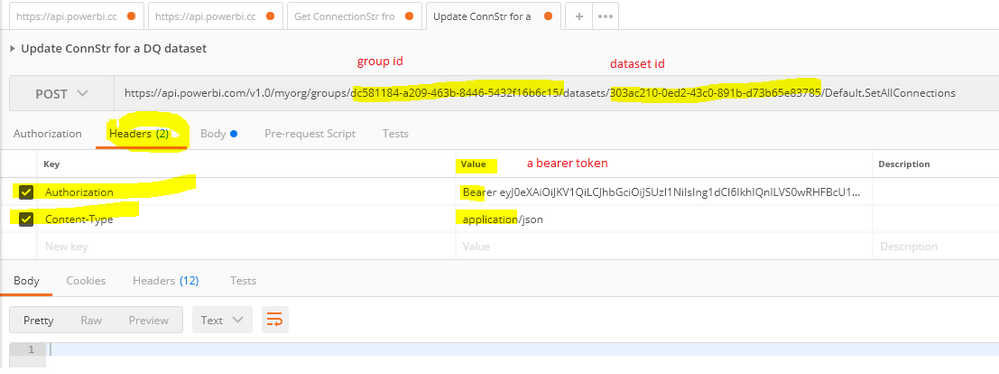
If you don't have coding skill, you can use some REST API console like postman. Note that the Set All Connections only works for the datasets in DirectQuery mode. For import mode, there's no way to update the connection string, AFAIK.


Steps to perform the post method in postman. Where to get a bearer token?
Capture.PNG


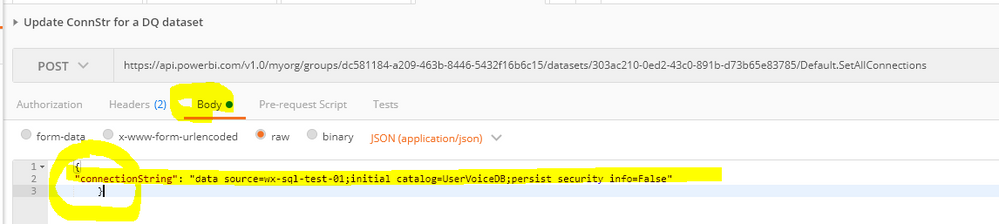
A sample connection string for SQL Server database.

    {
    "connectionString": "data source=wx-sql-test-01;initial catalog=UserVoiceDB;persist security info=False"
        }
Capture.PNG


At last, add a datasource in the gateway for the datasource in the new connection string.

View solution in original post

1 REPLY 1
Eric_Zhang
Microsoft Employee
Microsoft Employee


@KRONOS wrote:

 Hello community, My problem is the following, I have 200 reports in power bi desktop with a data source and I need to publish using a gateway  on premise in the production environment that has a data source different from my reports and can not be changed also can't create new data source in gateway by client policies... I am investigating power bi api rest

http://docs.powerbi.apiary.io/#reference/datasets/update-all-connection-strings

to update the dataset but the code does not work for me, I do not know how to perform the post method in . net.. 


@KRONOS

If you don't have coding skill, you can use some REST API console like postman. Note that the Set All Connections only works for the datasets in DirectQuery mode. For import mode, there's no way to update the connection string, AFAIK.


Steps to perform the post method in postman. Where to get a bearer token?

Capture.PNG


A sample connection string for SQL Server database.

    {
    "connectionString": "data source=wx-sql-test-01;initial catalog=UserVoiceDB;persist security info=False"
        }

Capture.PNG


At last, add a datasource in the gateway for the datasource in the new connection string.

Helpful resources

Announcements
Power BI DataViz World Championships

Power BI Dataviz World Championships

The Power BI Data Visualization World Championships is back! Get ahead of the game and start preparing now!

December 2025 Power BI Update Carousel

Power BI Monthly Update - December 2025

Check out the December 2025 Power BI Holiday Recap!

FabCon Atlanta 2026 carousel

FabCon Atlanta 2026

Join us at FabCon Atlanta, March 16-20, for the ultimate Fabric, Power BI, AI and SQL community-led event. Save $200 with code FABCOMM.