Join us at FabCon Atlanta from March 16 - 20, 2026, for the ultimate Fabric, Power BI, AI and SQL community-led event. Save $200 with code FABCOMM.
Register now!The Power BI Data Visualization World Championships is back! Get ahead of the game and start preparing now! Learn more
Hi, all, this seems like an overly easy question, but I've spent over 2 hours looking for the answer online and cannot find it anywhere. I'm building a report in Power BI Report Builder and I need to be able to define the ReportName. I need to use a Report Name parameter (Global!ReportName) to filter my dataset, but I cannot find a place to define the report name anywhere. By default it is blank, I tested a lot of different things, but nothing so far.
We generally are using Visual Studio to build SSRS reports, which simply allows you to define the file name in Properties.
Any pointers would be super helpful! Thanks.
Solved! Go to Solution.
Hi @AusteM ,
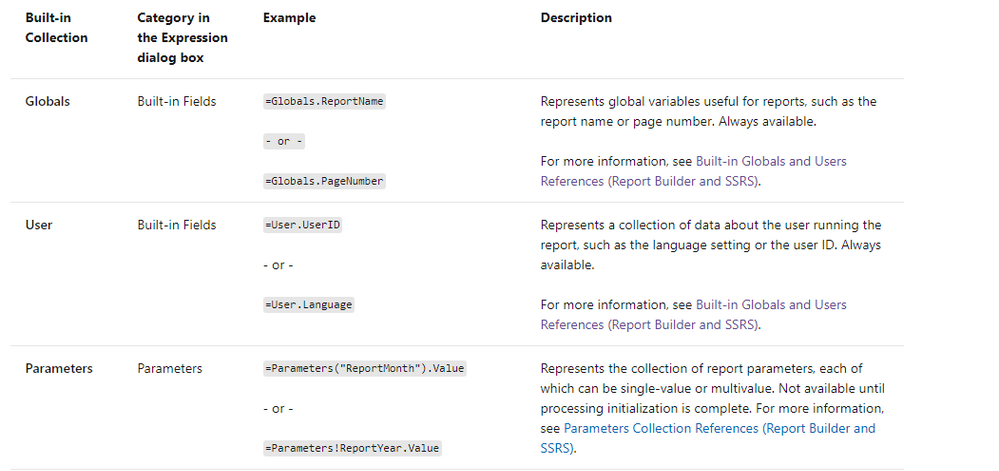
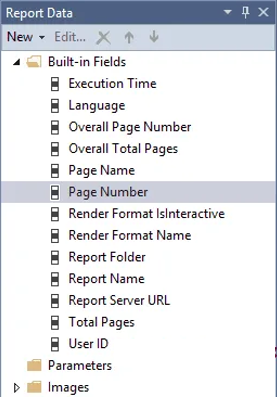
According to the official documents, The Globals collection contains the global variables for the report. On the design surface, these variables appear prefixed by an & (ampersand). [&ReportName].
For examples:
=Globals.ReportName & ", dated " & Format(Globals.ExecutionTime, "d")
This expression provides the name of the report and the time it was run. The time is formatted with the Microsoft .NET Framework formatting string for short date:
Refer to:
Expression examples in Power BI Report Builder - Power BI | Microsoft Docs
Best Regards,
Eyelyn Qin
If this post helps, then please consider Accept it as the solution to help the other members find it more quickly.
Hi @AusteM ,
According to the official documents, The Globals collection contains the global variables for the report. On the design surface, these variables appear prefixed by an & (ampersand). [&ReportName].
For examples:
=Globals.ReportName & ", dated " & Format(Globals.ExecutionTime, "d")
This expression provides the name of the report and the time it was run. The time is formatted with the Microsoft .NET Framework formatting string for short date:
Refer to:
Expression examples in Power BI Report Builder - Power BI | Microsoft Docs
Best Regards,
Eyelyn Qin
If this post helps, then please consider Accept it as the solution to help the other members find it more quickly.
The Power BI Data Visualization World Championships is back! Get ahead of the game and start preparing now!