cancel
Showing results for 
Search instead for 
Did you mean: 

View all the Fabric Data Days sessions on demand. View schedule

Reply
MHald
Regular Visitor

Power BI REST API for Capacities - Syntax for $filter with nested json

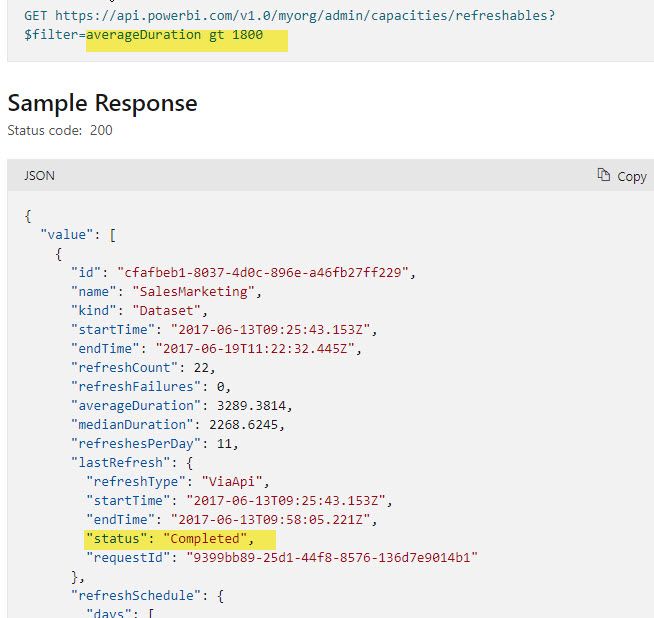
I am trying to filter the admin capatities api for the nested status of the last refresh, but am having trouble with the syntax for the api call. Here is an example of a call that doesn't work.  I have tried many different delimeters with no success.  I have provided an example of the response below.  The short question:  How do I filter on just the lastRefresh status?


refreshables_url = "https://api.powerbi.com/v1.0/myorg/admin/capacities/refreshables?$filter=lastRefresh/status eq Failed


The below documentation only shows a filtering example at the top level.

https://docs.microsoft.com/en-us/rest/api/power-bi/admin/get-refreshables#code-try-0

RefreshablesAPI.jpg

3 REPLIES 3
MHald
Regular Visitor

Thanks for post!  I have used the dataset API before and then looped through the output in my PowerShell.  I was hoping the Capacity Refresh API allowed me to do this within a single call, using the nested json output in the $filter.  My alternative using this API is to pull back a day's worth of refreshes into an object variable and drill down to the status within PowerShell.  Thought I wouldn't have to do that, but maybe the code behind the API doesn't allow to filter on anything nested in the response.  It would just be good to know this in their documentation so I am not wasting my time trying to figure it out.

v-yalanwu-msft
Community Support
Community Support

Hi, @MHald ;

You can check if these related post can is useful to you.

https://community.powerbi.com/t5/Developer/API-Get-Last-Refresh-of-all-reports-of-a-workspace/m-p/39...


Best Regards,
Community Support Team_ Yalan Wu
If this post helps, then please consider Accept it as the solution to help the other members find it more quickly.

Just leaving this here for others:


Status is an enum:

'Unknown' is '0'

'Completed' is '1'

'Failed' is '2'


$filter=(cast(lastRefresh/status, 'Edm.String') eq '2'

or
$filter=(lastRefresh/status eq Microsoft.PowerBI.ServiceContracts.Api.DatasetRefreshHistoryStatus'2')

https://stackoverflow.com/questions/66323597/issue-building-a-rest-api-query-using-filter-for-power-...

Helpful resources

Announcements
November Power BI Update Carousel

Power BI Monthly Update - November 2025

Check out the November 2025 Power BI update to learn about new features.

Fabric Data Days Carousel

Fabric Data Days

Advance your Data & AI career with 50 days of live learning, contests, hands-on challenges, study groups & certifications and more!

FabCon Atlanta 2026 carousel

FabCon Atlanta 2026

Join us at FabCon Atlanta, March 16-20, for the ultimate Fabric, Power BI, AI and SQL community-led event. Save $200 with code FABCOMM.

Top Solution Authors