cancel
Showing results for 
Search instead for 
Did you mean: 

The Power BI Data Visualization World Championships is back! Get ahead of the game and start preparing now! Learn more

Reply
kaarel
Resolver I
Resolver I

Power BI Per User upgrade from Power BI Pro not working

Hi!


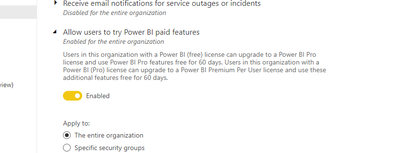
I am global administrator in my tenant and this setting is enabled.


kaarel_0-1616602544366.png


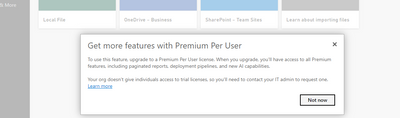
When I try to do something with Permium workspace, no upgrade/trial option is shown.


kaarel_1-1616602618435.png


Other account upgraded last week, works fine and shows Premium Per User licence.


Is there any problem currently with this preview functionality?


Thanks,
Kaarel.


1 ACCEPTED SOLUTION

Is any user able to access your PPU workspaces? If yes then you may unassign from Premium for now and work with Pro till April2 when you can upgrade back. You may choose to add some dummy users in O365 Admin and have those accounts to access till then with trials. This is what we are doing till April 2. We have created several test users and upgraded them to PPU trials and shared their access amongst those whose trial has expired.

View solution in original post

5 REPLIES 5
Anonymous
Not applicable

Hi @kaarel ,


Check if Self-service purchase setting is enable. Refer https://docs.microsoft.com/en-us/power-bi/admin/service-admin-portal#allow-users-to-try-power-bi-pai... 

4.PNG


Best Regards,

Jay

GilbertQ
Super User
Super User

Hi @kaarel 


You have to upgrade the PPU license in the Office 365 Admin Portal and then assign the PPU trail license to the user.


Here are more details: Power BI Premium per user public preview now available | Microsoft Power BI Blog | Microsoft Power B...


Did I answer your question? Mark my post as a solution!

Proud to be a Super User!


Power BI Blog

Anonymous
Not applicable

Agreed, I am experiencing the same issue. Our trials just expired and now there is no way to reassign trial and also no way to purchase yet. This is a huge issue as we have already converted our workspaces over to premium and so our users have zero access during our rollout. We need Microsoft's help here....


Michael

Is any user able to access your PPU workspaces? If yes then you may unassign from Premium for now and work with Pro till April2 when you can upgrade back. You may choose to add some dummy users in O365 Admin and have those accounts to access till then with trials. This is what we are doing till April 2. We have created several test users and upgraded them to PPU trials and shared their access amongst those whose trial has expired.

Hi.


There are no detail is that article how to "upgrade the PPU license in the Office 365 Admin Portal and then assign the PPU trail license to the user".


How can I do that? 


Best Wishes,
Kaarel.

Helpful resources

Announcements
Power BI DataViz World Championships

Power BI Dataviz World Championships

The Power BI Data Visualization World Championships is back! Get ahead of the game and start preparing now!

December 2025 Power BI Update Carousel

Power BI Monthly Update - December 2025

Check out the December 2025 Power BI Holiday Recap!

FabCon Atlanta 2026 carousel

FabCon Atlanta 2026

Join us at FabCon Atlanta, March 16-20, for the ultimate Fabric, Power BI, AI and SQL community-led event. Save $200 with code FABCOMM.