 Hi,
Hi,
Below is my javascript in my html:
<script type="text/javascript">
    var report;
    var accessToken = "{{ token }}";
    var embedUrl = "{{ embed_url }}";
    var embedReportId = "{{ report_id }}";
    var models = window['powerbi-client'].models;
    var page = "{{ layout }}";

     var  basicFilter = {
       $schema: "http://powerbi.com/product/schema#advanced",
      target: {
        table: "analysis_hierarchy",
        column: "l2_name"
      },
      logicalOperator: "OR",
      conditions: [
        {
          operator: "Contains",
          value: "West"
        },
        {
          operator: "Contains",
          value: "East"
        }
      ]
    };

    var embedConfiguration = {
        type: 'report',
        pageName: page,
        tokenType: models.TokenType.Embed,
        accessToken: accessToken,
        embedUrl: embedUrl,
        id: embedReportId,
        permissions: models.Permissions.All,
        settings: {
            navContentPaneEnabled: false
            {#filterPaneEnabled: false#}
        }
    };

    window.onload = function () {

        var $reportContainer = $('#reportContainer');
        report = powerbi.embed($reportContainer.get(0), embedConfiguration);
        console.log("report rendered... now setting filter");
        report.on('loaded', event => {
          report.getFilters()
            .then(filters => {
              console.log("before pushing filter");
              filters.push(basicFilter);
                                        console.log("after pushing filter");

              return report.setFilters(filters);
                                        console.log("after setting filter");

            });
        });
    };

</script>
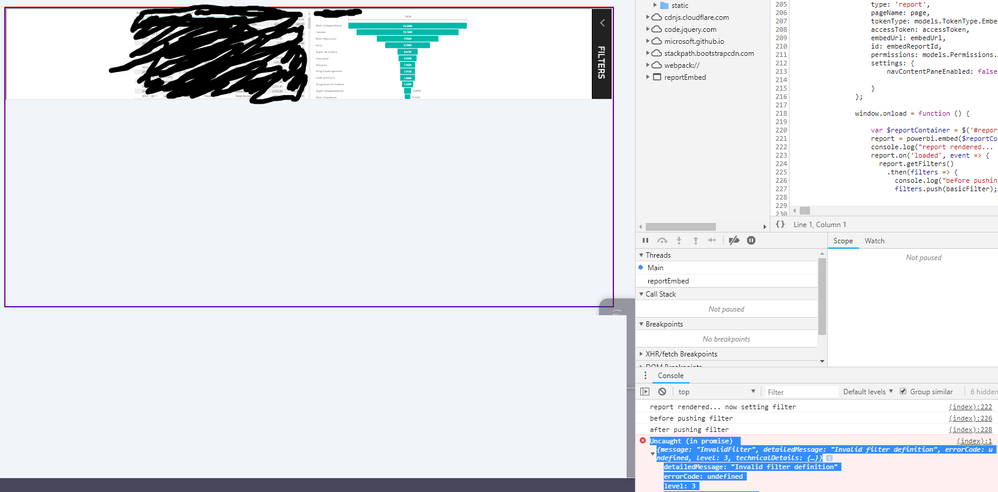
I am getting a javascript exception:
Uncaught (in promise)
- {message: "InvalidFilter", detailedMessage: "Invalid filter definition", errorCode: undefined, level: 3, technicalDetails: {…}}
- detailedMessage: "Invalid filter definition"
- errorCode: undefined
- level: 3
- message: "InvalidFilter"
I tried various different ways of creating filters, also passing filters directly into the embed() function, but none of them work.
Also, when embedding the report, the size rendered doesn't use all the real-estate even though I give the div's enough space (red and blue border):
I am importing the following:
<!-- Microsoft Power BI -->
<script src="https://microsoft.github.io/PowerBI-JavaScript/demo/node_modules/jquery/dist/jquery.js"></script>
<script src="https://microsoft.github.io/PowerBI-JavaScript/demo/node_modules/powerbi-client/dist/powerbi.js"></script>
After this import, I am loading Bootstrap CSS and JavaScript. I also tried adding the MS JavaScript to the end of the <body> tag. Nothing seem to do anything...
Any ideas?
Thanks,
Sebastian


