Get certified for free when you join Fabric Data Days 2026 and dive into Fabric, Power BI, SQL, AI, and other essential data skills.
Join nowJuly 7 - July 17 | Round 2 of the Power BI Dataviz World Championships. Don't miss your chance! Learn more
My data is on an on-premises server running PostgreSQL DBMS.
I want a dashboard for a small number of key metrics. The data changes on average once every 5-10 minutes.
If a user has to press F5 or a refresh button to see data that changed from 5-10 minutes ago that is OK.
Can I do this with Power BI?
I've tried doing this, spent MANY hours on it, and with all the complexity and confusion with app.powerbi.com, power bi desktop, on premises gateway, on premises gateway personal, reports vs dashboards...it is way too much for me to figure out if I can do such a simple thing.
Can someone just tell me if this is a reasonably easy thing to do?
And if not, but I can get away with a simple periodic automated replication of the Postgresql data (it is small) into an on-premises SQL Servr, then I will do that.
Hi @jeffwinchell,
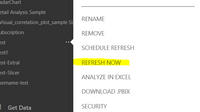
In your scenario, after you connect to PostgreSQL databases from Power BI Desktop, create reports and publish the Power BI Desktop file to Power BI Service. Then you can install gateway, and add the PostgreSQL data source(please see picture1). Configure a data refresh schedule, so that you can use gateway to refresh your dataset in Power BI Service. In this way, each time you make changes in PostgreSQL data source, the changes will be reflected in dataset and reports in Power BI Service based on refresh schedule. If you want to see the changed data using a refresh button, you can click "Refresh Now"(picture2) of your dataset, for more details, please review the links given above.picture1
Best Regards,
Angelia
It seems to me that the most frequent the scheduled refresh does is once a day. Does anyone see anything differently?
If so, that is not nearly frequent enough.
At this point we seem to have two options:
1. replicate the data more frequently to a SQL Server database (which can get much more closer to real time data) and then connect that database to Power BI.
2. hack via webscraping and a scheduled repetitive task, the Refresh Now button so that I can automate the pushing of that button on a frequency we need
Does anyone see any other options?
Now Power BI supports customized refresh schedule option.
Hi @jeffwinchell,
Until now, the refresh schedule can not support the custom times refresh. Please vote the following ideas.
https://ideas.powerbi.com/forums/265200-power-bi-ideas/suggestions/19389373-customized-scheduled-ref...
https://ideas.powerbi.com/forums/265200-power-bi-ideas/suggestions/11608869-hourly-refresh
Best Regards,
Angelia
Join us in Barcelona for FabCon and SQLCon, the Fabric, Power BI, SQL, and AI community event. Save €200 with code FABCMTY200.
Join Data Days 2026: 60 days of free live/on-demand sessions, challenges, study groups, and certification opportunities.
| User | Count |
|---|---|
| 25 | |
| 10 | |
| 10 | |
| 5 | |
| 4 |