cancel
Showing results for 
Search instead for 
Did you mean: 

We've captured the moments from FabCon & SQLCon that everyone is talking about, and we are bringing them to the community, live and on-demand. Starts on April 14th. Register now

Reply
jeffwinchell
Advocate I
Advocate I

PostgreSQL Dashboard Refresh

My data is on an on-premises server running PostgreSQL DBMS.


I want a dashboard for a small number of key metrics. The data changes on average once every 5-10 minutes.


If a user has to press F5 or a refresh button to see data that changed from 5-10 minutes ago that is OK.


Can I do this with Power BI?


I've tried doing this, spent MANY hours on it, and with all the complexity and confusion with app.powerbi.com, power bi desktop, on premises gateway, on premises gateway personal, reports vs dashboards...it is way too much for me to figure out if I can do such a simple thing.


Can someone just tell me if this is a reasonably easy thing to do?


And if not, but I can get away with a simple periodic automated replication of the Postgresql data (it is small) into an on-premises SQL Servr, then I will do that.

4 REPLIES 4
v-huizhn-msft
Microsoft Employee
Microsoft Employee

Hi @jeffwinchell,

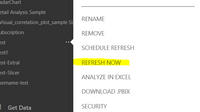
In your scenario, after you connect to PostgreSQL databases from Power BI Desktop, create reports and publish the Power BI Desktop file to Power BI Service. Then you can install gateway, and add the PostgreSQL data source(please see picture1). Configure a data refresh schedule,  so that you can use gateway to refresh your dataset in Power BI Service. In this way, each time you make changes in PostgreSQL data source, the changes will be reflected in dataset and reports in Power BI Service based on refresh schedule. If you want to see the changed data using a refresh button, you can click "Refresh Now"(picture2) of your dataset, for more details, please review the links given above.

picture1picture12.PNG

Best Regards,
Angelia

It seems to me that the most frequent the scheduled refresh does is once a day. Does anyone see anything differently?

If so, that is not nearly frequent enough.


At this point we seem to have two options:

1. replicate the data more frequently to a SQL Server database (which can get much more closer to real time data) and then connect that database to Power BI.

2. hack via webscraping and a scheduled repetitive task, the Refresh Now button so that I can automate the pushing of that button on a frequency we need

Does anyone see any other options?


Anonymous
Not applicable

Now Power BI supports customized refresh schedule option.

Helpful resources

Announcements
New to Fabric survey Carousel

New to Fabric Survey

If you have recently started exploring Fabric, we'd love to hear how it's going. Your feedback can help with product improvements.

Power BI DataViz World Championships carousel

Power BI DataViz World Championships - June 2026

A new Power BI DataViz World Championship is coming this June! Don't miss out on submitting your entry.

Join our Fabric User Panel

Join our Fabric User Panel

Share feedback directly with Fabric product managers, participate in targeted research studies and influence the Fabric roadmap.

March Power BI Update Carousel

Power BI Community Update - March 2026

Check out the March 2026 Power BI update to learn about new features.