cancel
Showing results for 
Search instead for 
Did you mean: 

The Power BI Data Visualization World Championships is back! Get ahead of the game and start preparing now! Learn more

Reply
ninsights
Helper III
Helper III

Persistent Filters with Power BI Embedded in Teams

My users view their Power BI dashboards in Teams and they want to show these dashboards to their clients once per month on a Teams call. There are two dashboards. Each dashboard contains information for 4 clients and they don't want any client seeing the names/information of the other clients.

So, they filtered the firsat dashboard (embedded in Teams) for one client name. They then went to the second dashboard and filtered that dashboard for the same client name and figured they were prepared for the client review call. The problem is, when they go back to the first dashboard, the filter for the client name has not "stuck" and all 4 clients information is showing.

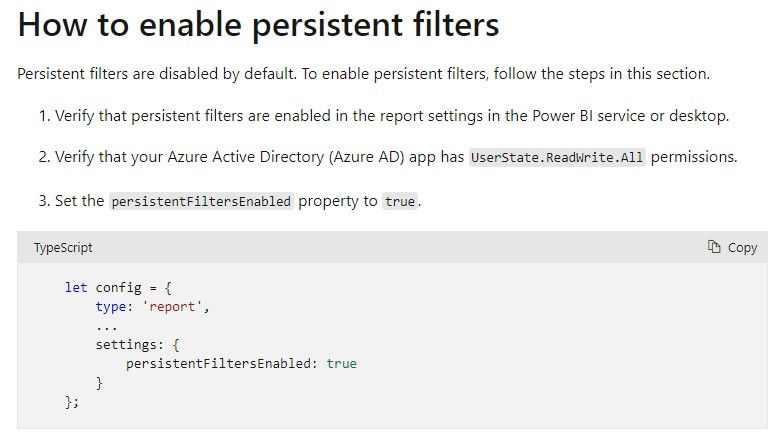
How do we make these filters persist (stick) in Teams? I found the following on the Microsoft site but it doesn't say where you put this script.


Persist.jpg

1 REPLY 1
lbendlin
Super User
Super User

"My users view their Power BI dashboards in Teams and they want to show these dashboards to their clients " 


IANAL but that sounds like a potential license violation.


"Each dashboard contains information for 4 clients and they don't want any client seeing the names/information of the other clients."


Do not do that. Have separate reports for separate audiences.


Helpful resources

Announcements
Power BI DataViz World Championships

Power BI Dataviz World Championships

The Power BI Data Visualization World Championships is back! Get ahead of the game and start preparing now!

November Power BI Update Carousel

Power BI Monthly Update - November 2025

Check out the November 2025 Power BI update to learn about new features.

FabCon Atlanta 2026 carousel

FabCon Atlanta 2026

Join us at FabCon Atlanta, March 16-20, for the ultimate Fabric, Power BI, AI and SQL community-led event. Save $200 with code FABCOMM.