cancel
Showing results for 
Search instead for 
Did you mean: 

The Power BI Data Visualization World Championships is back! Get ahead of the game and start preparing now! Learn more

Reply
chudson
Helper IV
Helper IV

Persistent Filters Disabled Not Working in Power BI Online

Hi,


I have "Don't allow end user to save filters on this file in the Power BI service" checked in my pbix file and showing online in the report settings but it doesn't seem to be working in my Power BI Online workspaces.  To restore i always have to select "Restore to default" which shouldn't be the case, I don't want these book marks saved as I toggle through the reports.  Does anyone know why?  It basically defaults to a current bookmark every time going back in or to other reports in other workspaces that share the same book marks which i don't want to have to hit restore to default each time.


chudson_2-1619029995981.png


chudson_1-1619029806581.png


chudson_0-1619029785715.png


Thanks,

Chris

3 REPLIES 3
David_QH
Advocate II
Advocate II

If you use a bookmark to get to the page with the filters that change, you will need to update the bookmark before publishing the report. 


Simply go to the page you have set the filters on in PowerBI desktop, open the Bookmark pane (via the View Menu Tab), right click on the ... of the page's bookmark, and click update.  Publish the report and it should now be fine. 


I didn't need to change the settings for Persistent Filters in this use case.

chudson
Helper IV
Helper IV

Hi @v-cazheng-msft 


I already have “Don’t allow end user to save filters on this report” enabled in all my reports but I do have buttons with bookmarks created in a .pbix files and published to the service for the end users to toggle between some views. The issue here is if a user clicks one of the buttons, then goes into another report or workspace, then comes back into the same report the bookmark button is saved and opens to that instead of the default report landing page it’s saved on. The only way it will not default to the button bookmark is if the user exits out of their browser and opens up a new window.


Any ideas on why or how to fix this? I’ve only noticed this fairly recently but have had button bookmarks in my reports for years and have not noticed this occurring before.


Thanks,

Chris

v-cazheng-msft
Community Support
Community Support

Hi @chudson 

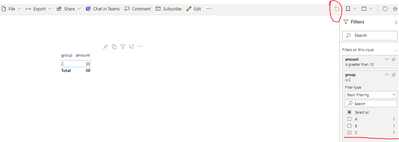
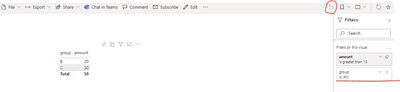
If you enable ‘Don’t allow end user to save filters on this report’, Power BI reports will not automatically retain the filters, slicers and other data view changes made to the reports. If you get the same result as test 1 after uploading the report, then your setup is successful. Otherwise, any changes to the filters on the report will be automatically saved and it reappears when reopening the report.


Test 1:

Make changes to the filters on the report:
v-cazheng-msft_0-1619419460693.png


Re-open the report and filters are not saved:
v-cazheng-msft_1-1619419460700.png


Test 2:

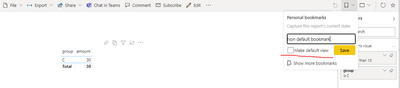
However, if users create a personal bookmark and make it as default. Every time the user opens the report, the default bookmark page will be opened. If create a report without making it as default, every time the report is opened, the default report page will be open without the influence of bookmark.
v-cazheng-msft_2-1619419460705.png


v-cazheng-msft_3-1619419460709.png


Best Regards

Caiyun Zheng


Is that the answer you're looking for? If this post helps, then please consider Accept it as the solution to help the other members find it more quickly.


Helpful resources

Announcements
Power BI DataViz World Championships

Power BI Dataviz World Championships

The Power BI Data Visualization World Championships is back! Get ahead of the game and start preparing now!

December 2025 Power BI Update Carousel

Power BI Monthly Update - December 2025

Check out the December 2025 Power BI Holiday Recap!

FabCon Atlanta 2026 carousel

FabCon Atlanta 2026

Join us at FabCon Atlanta, March 16-20, for the ultimate Fabric, Power BI, AI and SQL community-led event. Save $200 with code FABCOMM.

