Join us in Barcelona for FabCon and SQLCon, September 28 - October 1, 2026.
This is best Fabric, Power BI, SQL and AI community event. How do we know? The last event sold out! Save €200 with code FABCMTY200.
Register now- Power BI forums
- Get Help with Power BI
- Desktop
- Service
- Report Server
- Power Query
- Mobile Apps
- Developer
- DAX Commands and Tips
- Custom Visuals Development Discussion
- Health and Life Sciences
- Power BI Spanish forums
- Translated Spanish Desktop
- Training and Consulting
- Instructor Led Training
- Dashboard in a Day for Women, by Women
- Galleries
- Data Stories Gallery
- Themes Gallery
- Contests Gallery
- QuickViz Gallery
- Quick Measures Gallery
- Visual Calculations Gallery
- Fabric Apps Gallery
- Notebook Gallery
- Translytical Task Flow Gallery
- TMDL Gallery
- R Script Showcase
- Webinars and Video Gallery
- Ideas
- Custom Visuals Ideas (read-only)
- Issues
- Issues
- Events
- Upcoming Events
The Fabric community is now in read-only for platform upgrade. Learn more
- Power BI forums
- Forums
- Get Help with Power BI
- Service
- Re: Partial Data-source Refresh
- Subscribe to RSS Feed
- Mark Topic as New
- Mark Topic as Read
- Float this Topic for Current User
- Bookmark
- Subscribe
- Printer Friendly Page

- Mark as New
- Bookmark
- Subscribe
- Mute
- Subscribe to RSS Feed
- Permalink
Partial Data-source Refresh
Hi everyone!
I have a report where I am pulling data from multiple data sources.
Most of this is fine, as I am getting data from the web (kobo toolbox), from 9 data-sources (all formated similarly and appended). Everything refreshes normaly.
The problem is that i also have several .XLS data sources (also formatted and appended ) that work fine in BI Desktop, but there is a problem when refreshing the dataset through the service.
This .XLS data does not need to be refreshed. They are old back-up files that are useful in terms of statistics and vizualisation, but that are never updated.
I can't "enter" the data directly into BI Desktop (too many columns), nor can i upload it as a dataset to the BI service (it does not allow me to create reports with BI service data and other live data).
As it is impossible to "tell" the service only to update data collected from the web, and leave the .xls files alone (do not refresh), what would be your proposal on solving this in terms of best practice.
Move the .XLS to OneDrive, Sharepoint, Dropbox...? Is there something more obvious that I am missing?
Thank you in advance!
Zeljko
Solved! Go to Solution.

- Mark as New
- Bookmark
- Subscribe
- Mute
- Subscribe to RSS Feed
- Permalink
Hi Zeljko,
There is a new feature under preview called "Incremental refresh". Surely it has some limitations for now. I wounder if it could help in your scenario. You can give it a try. Please refer to power-bi-desktop-may-2018-feature-summary/#incrementalRefresh.
Best Regards,
Dale
If this post helps, then please consider Accept it as the solution to help the other members find it more quickly.


- Mark as New
- Bookmark
- Subscribe
- Mute
- Subscribe to RSS Feed
- Permalink
Hi @zbareta,
@v-jiascu-msft is correct, you can use this feature and I suggest you concentrate on Detect data changes part:
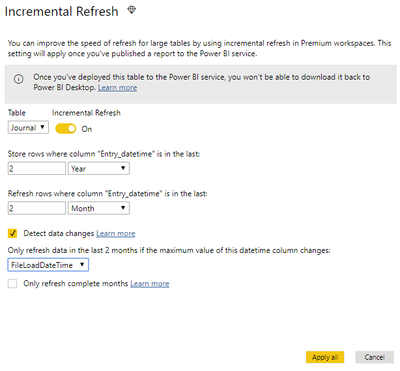
Be aware that it is applicable for all Power BI Premium and Power BI Embedded capacities (starting from A3).
https://docs.microsoft.com/en-us/power-bi/service-premium-incremental-refresh

- Mark as New
- Bookmark
- Subscribe
- Mute
- Subscribe to RSS Feed
- Permalink
Hi, I don't know if t his thread is still going, but to my knowledge Power BI service does not allow the refresh of .XLS files on a schedule, just via refresh and publish in the desktop app. that said, it is possible to remove a table from a report refresh:
you right click on the table in query editor and untick "Include in report refresh" that way the data remains static and the refresh skips that table

- Mark as New
- Bookmark
- Subscribe
- Mute
- Subscribe to RSS Feed
- Permalink
@Anonymous https://community.powerbi.com/t5/Service/Partial-Data-source-Refresh/m-p/622562#M62107
Thanks so much for this answer! Incremental refreshes would not work for me since I have a data source that is no longer functioning


- Mark as New
- Bookmark
- Subscribe
- Mute
- Subscribe to RSS Feed
- Permalink
I think that even if the file is part of the desktop file it would want it to be connected to the Gateway?
- Mark as New
- Bookmark
- Subscribe
- Mute
- Subscribe to RSS Feed
- Permalink
Hi Zeljko,
There is a new feature under preview called "Incremental refresh". Surely it has some limitations for now. I wounder if it could help in your scenario. You can give it a try. Please refer to power-bi-desktop-may-2018-feature-summary/#incrementalRefresh.
Best Regards,
Dale
If this post helps, then please consider Accept it as the solution to help the other members find it more quickly.
- Mark as New
- Bookmark
- Subscribe
- Mute
- Subscribe to RSS Feed
- Permalink
Hi @zbareta,
@v-jiascu-msft is correct, you can use this feature and I suggest you concentrate on Detect data changes part:
Be aware that it is applicable for all Power BI Premium and Power BI Embedded capacities (starting from A3).
https://docs.microsoft.com/en-us/power-bi/service-premium-incremental-refresh
- Mark as New
- Bookmark
- Subscribe
- Mute
- Subscribe to RSS Feed
- Permalink
Currently Power BI will refresh all the data in the model and there is no way to only refresh selected data.
Helpful resources

FabCon & SQLCon – Barcelona 2026
Join us in Barcelona for FabCon and SQLCon, the Fabric, Power BI, SQL, and AI community event. Save €200 with code FABCMTY200.

Power BI DataViz World Championships - June 2026
A new Power BI DataViz World Championship is coming this June! Don't miss out on submitting your entry.

| User | Count |
|---|---|
| 15 | |
| 11 | |
| 9 | |
| 8 | |
| 6 |


| User | Count |
|---|---|
| 29 | |
| 23 | |
| 17 | |
| 15 | |
| 13 |


