cancel
Showing results for 
Search instead for 
Did you mean: 

The Power BI Data Visualization World Championships is back! Get ahead of the game and start preparing now! Learn more

Reply
KellyPorter
Frequent Visitor

PBI Data Source Failed Refresh From OneDrive

From the Power BI service I was able to connect successfully to an Excel file (xlsx) on OneDrive for Business, but when I tried to refresh the file a few minutes later I got the error:

"Data source error: Unable to refresh the model (id=xxxxxxx) because it references an unsupported data source"

How is it possible that I just connected to the source and was able to use the data, then minutes later it is suddenly unsupported and can no longer refresh?

5 REPLIES 5
ankitpatira
Community Champion
Community Champion

@KellyPorter are you connecting to external source from the Excel in Onedrive ? if yes then i think that is what that error means. I would suggest go through this guide and troubleshoot it from there.

@ankitpatira Thank you for your response.  I connected from Power BI web service to the Excel file via:

Get Data\Import or Connect to Data\Files\OneDrive Business\Import Excel Data Into Power BI


The dataset was successfully imported and I was able to use it in visualizations.  However, when I try to refresh, it fails and give the error "Data source error: Unable to refresh the model (id=xxxxxxx) because it references an unsupported data source."


Now, I have used the exact same steps to import another file from OneDrive for Business.  The dataset was added successfully, but when I look at Schedule Refresh for that dataset it now says that a personal gateway must be configured AND it shows that OneDrive Refresh in enabled.  Is that even possible?  When I select Refresh Now, the refresh fails with the error that "Your data gateway (Power BI - Personal) is offline or could not be reached."


@KellyPorter


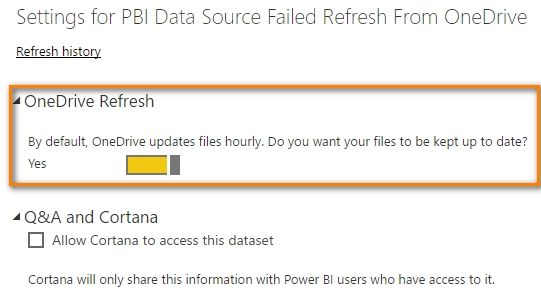
According to this document and based on my testing, refreshing from OneDrive Business should not need a gateway. By default, OneDrive updates files hourly as below. What about the result if you install and keep personal gateway online?

PBI Data Source Failed Refresh From OneDrive_1.jpg


Best Regards,

Herbert

@v-haibl-msft thank you for your response.  I am trying to avoid using a personal gateway in this instance as I am developing the report to hand over to another user to manage going forward.  Considering that I can connect to the file initially as a OneDrive file, I don't understand why the file is stops being recognized as such.


Also, I continue to have issues with O365 Single Sign On errors in Power BI Desktop only. 

@KellyPorter


I’ve recorded my steps in following gif, could you please have a look to see if there is any difference between us? A personal gateway is not needed in my side.

PBI Data Source Failed Refresh From OneDrive


Best Regards,

Herbert

Helpful resources

Announcements
Power BI DataViz World Championships

Power BI Dataviz World Championships

The Power BI Data Visualization World Championships is back! Get ahead of the game and start preparing now!

December 2025 Power BI Update Carousel

Power BI Monthly Update - December 2025

Check out the December 2025 Power BI Holiday Recap!

FabCon Atlanta 2026 carousel

FabCon Atlanta 2026

Join us at FabCon Atlanta, March 16-20, for the ultimate Fabric, Power BI, AI and SQL community-led event. Save $200 with code FABCOMM.