cancel
Showing results for 
Search instead for 
Did you mean: 

Get Fabric Certified for FREE during Fabric Data Days. Don't miss your chance! Request now

Reply
Kristofferaabo
Helper IV
Helper IV

Other users can not enter my shared workspace?

Hi,


In our group we want to be able to work with the same reports via a shared 'group workspace'. I have made a pilot, and published a test report to the workspace and given my team members access and rights (admin).


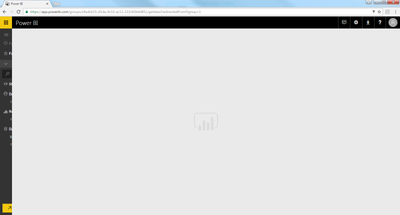
But they are not able to enter?! It just loads and loads and they can not access the menu on the left. This is the case with all the team members. Please see screen shot below.


Is there anything I do wrong? - we are not PRO users, is that the reason?


Best regards


Kristoffer


ex.png


1 ACCEPTED SOLUTION

Hi @Kristofferaabo,


As @Seth_C_Bauer suggested, the group workspace is Power BI pro feature, both group creator and group members require Pro license.


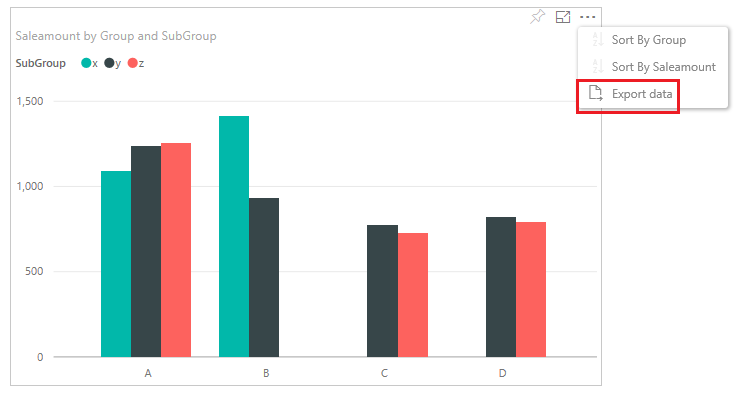
In your scenario, to let the user export data from dashboards, you can pin the report visual to a dashboard then share the dashboard with users. Users can export data from dashboard visuals or click into the report from the dashboard visual, then use Export Data feature. See: Export data from Power BI visualizations.


q3.PNG


Best Regards,
Qiuyun Yu

Community Support Team _ Qiuyun Yu
If this post helps, then please consider Accept it as the solution to help the other members find it more quickly.

View solution in original post

5 REPLIES 5
Seth_C_Bauer
Community Champion
Community Champion

@Kristofferaabo I'm surprised you were able to create a group workspace at all if you aren't a "Pro" user... To answer your question, "Yes" this is a Pro level feature and all members would need to have a Pro license.


The high level functionality between Pro and Free can be found here


Looking for more Power BI tips, tricks & tools? Check out PowerBI.tips the site I co-own with Mike Carlo. Also, if you are near SE WI? Join our PUG Milwaukee Brew City PUG

Hi, Yes I knew that the creator should be pro but I was not aware that the group members also had to be.


Main thing we wan is to be able to export the data from the tables/dashboards, and I can only find that feature in the direct report.


Thanks for your comments

Kristoffer

Hi @Kristofferaabo,


As @Seth_C_Bauer suggested, the group workspace is Power BI pro feature, both group creator and group members require Pro license.


In your scenario, to let the user export data from dashboards, you can pin the report visual to a dashboard then share the dashboard with users. Users can export data from dashboard visuals or click into the report from the dashboard visual, then use Export Data feature. See: Export data from Power BI visualizations.


q3.PNG


Best Regards,
Qiuyun Yu

Community Support Team _ Qiuyun Yu
If this post helps, then please consider Accept it as the solution to help the other members find it more quickly.

Dear both, thanks for confirming! I will look into the dashboarding.. just a bit annoyed that it often takes the user back in the report if you click... My report has a lot of slicers, which ends up in a table I would like the user to be able to export..


Thanks again

K

Hi @Kristofferaabo,


By default, clicking a tile takes you to the report where the tile was created or to Q&A (if the tile was created in Q&A). In your scenario, if you want users only export data from table visual, you can only pin the table visual from the report to dashboard, then set the custom link for this tile. So that users will not able to go to the report.


q3.PNG


Reference:
Select (click) a tile


Best Regards,
Qiuyun Yu

Community Support Team _ Qiuyun Yu
If this post helps, then please consider Accept it as the solution to help the other members find it more quickly.

Helpful resources

Announcements
November Power BI Update Carousel

Power BI Monthly Update - November 2025

Check out the November 2025 Power BI update to learn about new features.

Fabric Data Days Carousel

Fabric Data Days

Advance your Data & AI career with 50 days of live learning, contests, hands-on challenges, study groups & certifications and more!

FabCon Atlanta 2026 carousel

FabCon Atlanta 2026

Join us at FabCon Atlanta, March 16-20, for the ultimate Fabric, Power BI, AI and SQL community-led event. Save $200 with code FABCOMM.

Top Solution Authors
Top Kudoed Authors