Join us at FabCon Atlanta from March 16 - 20, 2026, for the ultimate Fabric, Power BI, AI and SQL community-led event. Save $200 with code FABCOMM.
Register now!Vote for your favorite vizzies from the Power BI Dataviz World Championship submissions. Vote now!
How do I change the order in which reports are listed in the left nav in the App? They are currently in non-alphabetical order and do not match the order in the workspace.
Thank you!
Solved! Go to Solution.
Hi @paythepiper
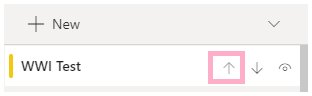
When you are creating or updating the App, you can use the arrow buttons as shown below to put them in the order you want.
Hi @paythepiper
When you are creating or updating the App, you can use the arrow buttons as shown below to put them in the order you want.
If you love stickers, then you will definitely want to check out our Community Sticker Challenge!
Check out the January 2026 Power BI update to learn about new features.
| User | Count |
|---|---|
| 19 | |
| 10 | |
| 9 | |
| 8 | |
| 7 |
| User | Count |
|---|---|
| 49 | |
| 41 | |
| 30 | |
| 27 | |
| 25 |