cancel
Showing results for 
Search instead for 
Did you mean: 

The Power BI Data Visualization World Championships is back! Get ahead of the game and start preparing now! Learn more

Reply
paythepiper
Frequent Visitor

Order of Reports in APP

How do I change the order in which reports are listed in the left nav in the App?  They are currently in non-alphabetical order and do not match the order in the workspace.


Thank you!

1 ACCEPTED SOLUTION
GilbertQ
Super User
Super User

Hi @paythepiper 


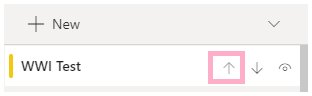
When you are creating or updating the App, you can use the arrow buttons as shown below to put them in the order you want.

image.png


Did I answer your question? Mark my post as a solution!

Proud to be a Super User!


Power BI Blog

View solution in original post

1 REPLY 1
GilbertQ
Super User
Super User

Hi @paythepiper 


When you are creating or updating the App, you can use the arrow buttons as shown below to put them in the order you want.

image.png


Did I answer your question? Mark my post as a solution!

Proud to be a Super User!


Power BI Blog

Helpful resources

Announcements
November Power BI Update Carousel

Power BI Monthly Update - November 2025

Check out the November 2025 Power BI update to learn about new features.

Fabric Data Days Carousel

Fabric Data Days

Advance your Data & AI career with 50 days of live learning, contests, hands-on challenges, study groups & certifications and more!

FabCon Atlanta 2026 carousel

FabCon Atlanta 2026

Join us at FabCon Atlanta, March 16-20, for the ultimate Fabric, Power BI, AI and SQL community-led event. Save $200 with code FABCOMM.

Top Solution Authors