Join us at FabCon Atlanta from March 16 - 20, 2026, for the ultimate Fabric, Power BI, AI and SQL community-led event. Save $200 with code FABCOMM.
Register now!The Power BI Data Visualization World Championships is back! Get ahead of the game and start preparing now! Learn more
Hi All,
I have been going through these issues with the oracle database for a while.
1) I started to create a report using PBI Desktop and had some issues connecting to the ORA db and i followed the video (https://www.youtube.com/watch?v=2VeqOMAda1o) and could create a report and the report refreshes as expected.
2) Published the report to the PBI Service and i can view the report.
Issue is the report published to service , even when i click on the refresh button. I created the datasource and tested it successfully in PBI Service.
Here is what i see when i went to the gateways
When i click on Add to gateway , i go to the following screen and made the below seclections
In the connection string i entered
(DESCRIPTION =
(ADDRESS = (PROTOCOL = TCP)(HOST = servername.domain.local)(PORT = 1525))
(CONNECT_DATA =
(SERVER = DEDICATED)
(SERVICE_NAME = database.domain.local)
)
)
I get the below error, please advice
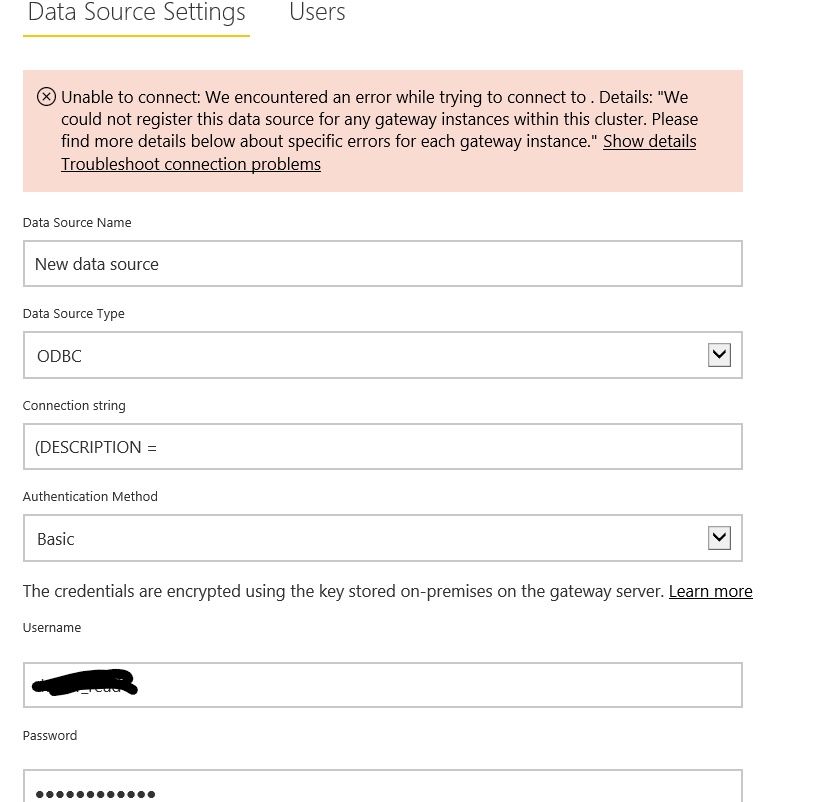
Second issue is with the paginated report connecting to the same Oracle db
Please advice
That's not how to specify an Oracle connection.
Notice that your dataset says "dsn=omsp" - that is the right way to do it on the PC.
Now what you need to do is to install the Oracle drivers on each gateway cluster member. You chose the ODBC driver on the desktop (for whatever reason - personally I prefer the native driver) so install the ODBC driver on the gateway cluster members too.
Then populate the TNSNAMES.ORA on each gateway cluster member accordingly.
Then setup your ODBC connection on each gateway cluster member and test the Oracle connectivity .
Then in your gateway settings use EXACTLY the same connection string "dsn=omsp". Nothing else.
Thanks i tried that as well, same issue 😞
switch to the native Oracle SQL*Net driver?
Can you please share a link to download Oracle SQL*Net driver
Thanks
You'll love this: You need to login to the Oracle download center to get the drivers.
🤣🤣🤣🤣
Covid ain't nothing compared to PBI & Oracle compatibility
Never ending woes with PBI, no idea why in the worl our management chose PBI over Tableau , hassle free and integrates with every dataosurce out there.
I tried using system dsn instead of the user dsn and same fudging error.
The Power BI Data Visualization World Championships is back! Get ahead of the game and start preparing now!