Don't miss your chance to take the Fabric Data Engineer (DP-700) exam on us!
Learn moreNext up in the FabCon + SQLCon recap series: The roadmap for Microsoft SQL and Maximizing Developer experiences in Fabric. All sessions are available on-demand after the live show. Register now
I am looking for more information on the topic of pulling the Power BI logs such as ULS for Power BI. Is this possible?
Does anyone have any information for obtainined the details about the event history for a Activity Id or Request Id.
Thanks in advance!
Richard
Solved! Go to Solution.
Hi @Anonymous
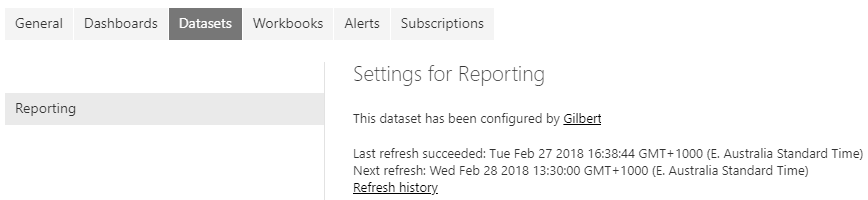
What I would suggest is going into the Dataset settings, where it is Scheduled for the Refresh.
And where it says Refresh history, click on the link which will give you more details as to why it failed.
Hi @Anonymous
What I would suggest is going into the Dataset settings, where it is Scheduled for the Refresh.
And where it says Refresh history, click on the link which will give you more details as to why it failed.
There was a hidden mapping on one of the databases that the service account didn't have access to the database. I am not sure if this was in a view or what, however, mapping the database to the service account should fix this issue. Easy fix!
Thanks,
Richard
If you have recently started exploring Fabric, we'd love to hear how it's going. Your feedback can help with product improvements.
A new Power BI DataViz World Championship is coming this June! Don't miss out on submitting your entry.
Share feedback directly with Fabric product managers, participate in targeted research studies and influence the Fabric roadmap.