Join us at FabCon Atlanta from March 16 - 20, 2026, for the ultimate Fabric, Power BI, AI and SQL community-led event. Save $200 with code FABCOMM.
Register now!Get Fabric Certified for FREE during Fabric Data Days. Don't miss your chance! Request now
Hi,
I have 3 reports from 3 datasets in an app I've published from a workspace. For some reason, however, when I navigate to the settings for these datasets, only one of them has OneDrive refresh available (see picture below). All three of the pbix files that I published to the workspace to create the datasets are saved in my Onedrive, did I somehow configure only one of them to have onedrive refresh? Thanks for your help on this.
Solved! Go to Solution.
hi @Anonymous
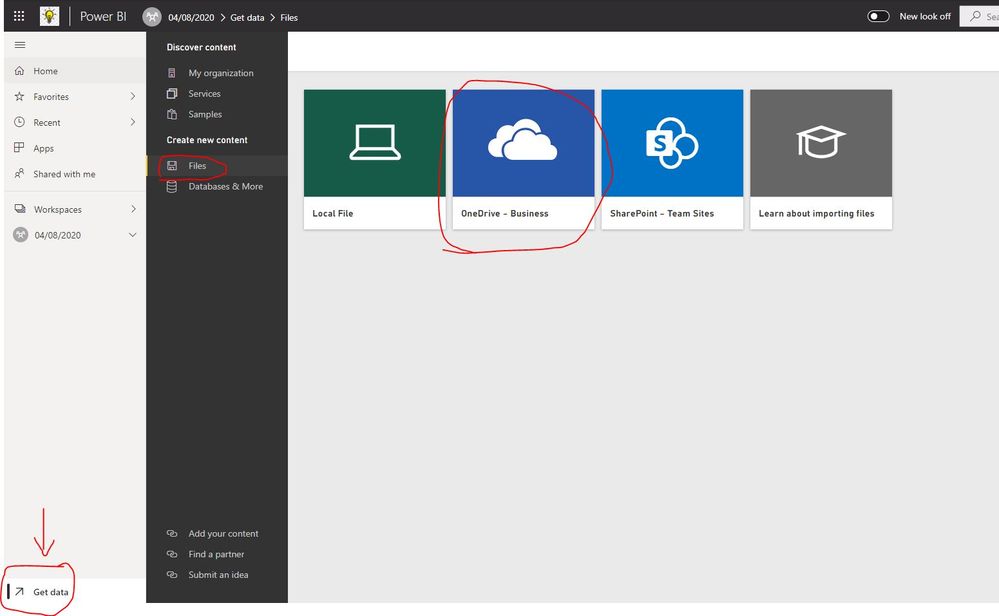
Onedrive refresh means that you put excel/csv/.pbix file in the onedrive, then in power bi service get data->files->Onedrive buiness, then import the excel/csv/.pbix file into power bi workspace, now this dataset will be OneDrive refresh.
In power bi desktop to get data from onedrive, and publish to service, this is not OneDrive refresh.
https://docs.microsoft.com/en-us/power-bi/connect-data/refresh-data#onedrive-refresh
Regards,
Lin
hi @Anonymous
Onedrive refresh means that you put excel/csv/.pbix file in the onedrive, then in power bi service get data->files->Onedrive buiness, then import the excel/csv/.pbix file into power bi workspace, now this dataset will be OneDrive refresh.
In power bi desktop to get data from onedrive, and publish to service, this is not OneDrive refresh.
https://docs.microsoft.com/en-us/power-bi/connect-data/refresh-data#onedrive-refresh
Regards,
Lin
Check out the November 2025 Power BI update to learn about new features.
Advance your Data & AI career with 50 days of live learning, contests, hands-on challenges, study groups & certifications and more!