Hello everyone,
For most of my reports I import dates using Google Analytics, which works flawlessly. Most commonly, I connect from Power BI desktop to GA, using the built-in connector, and retrieve the date table.
Recently I started to play around with the datasets and the dataflows from the online side of PBI.
Dataflows allows me to automatically retrieve all the dates since 2015 (start of our GA account) up until today. Once I import a the date dataflow into Power BI Desktop, the date feature works flawless as expected.
My problem starts when I connect a new dashboard in Power BI Desktop to a live dataset using the built-in connector. Aan example: I have an existing dashboard with data from last september until today (date data is being pulled using normal GA connector). When I create a line chart, the chart starts at the first date where data is available and stops on the date when the data ends. When I upload this dashboard to the online environment of PBI everything works as expected.
However, when I connect to this data flow and try to plot the same graph, I see way more date data that should not be present.
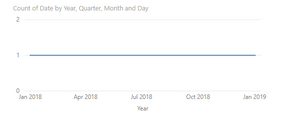
Normal situation with the dashboard with 'offline' information. Data starts in Jan 2018, as defined and runs through today.
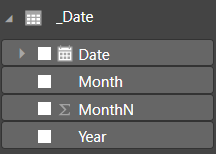
Problem situation when connecting to the same dataset, but this time it has been uploaded to PBI service. The data runs until the end of 2019 (impossible since GA doesn't allow future dates). These additional dates must have been generated by Power BI itself somewhere.
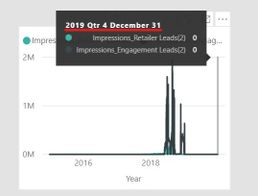
Does anyone know why these future dates are generated and how I can make my online dataset work similarly to a normal one?
Thanks!


