cancel
Showing results for 
Search instead for 
Did you mean: 

Data Days is here! Join us now for 60+ days of learning, challenges, and connection. Learn more

Reply
Anonymous
Not applicable

ODBC Data Connection: Scheduled Refresh Issue

Hi,


I have a Power BI Desktop dashboard connected to ODBC as the data source and it is published to Power BI Service.

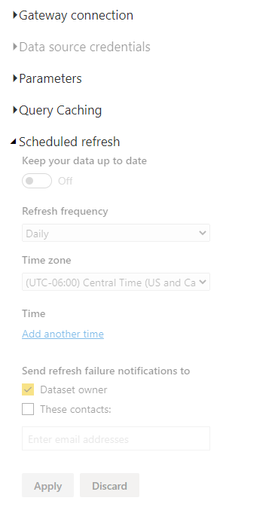
I would like to have this dashboard refreshed routinely. However, the scheduled refresh button is greyed out.


I referenced other Power BI Community threads, it is said the problem can be solved by setting up "Data Source Credentials". However, that function is greyed out for me as well.


Please share if there are any insights! Thank you in advance.


frt.PNG

1 REPLY 1
Shahfaisal
Solution Sage
Solution Sage

You will need to setup a gateway since you are using an ODBC connection - https://powerbi.microsoft.com/en-us/gateway/


Helpful resources

Announcements
Fabric Data Days is here Carousel

Fabric Data Days 2026

Don't miss out on Data Days, June 15 through August 7. Learn Fabric, Power BI, SQL, AI and more.

May Power BI Update Carousel

Power BI Monthly Update - May 2026

Check out the May 2026 Power BI update to learn about new features.

Power BI DataViz World Championships carousel

Power BI DataViz World Championships - June 2026

A new Power BI DataViz World Championship is coming this June! Don't miss out on submitting your entry.