cancel
Showing results for 
Search instead for 
Did you mean: 

The Power BI Data Visualization World Championships is back! Get ahead of the game and start preparing now! Learn more

Reply
remaster
Frequent Visitor

Numeric value separator difere from Desktop

I'm working in a report that has many numeric values, I put the regional settings to work in spanish.

So my data in Desktop is looking like this :

PowerBi Desktop


But in app.powerbi.com it looks like the comma separator and the decimal separator has changed positions , resulting in numbers like 2.515.596,45 that's not the desire behaivour.


What can I do to resolve this?


2 REPLIES 2
Anonymous
Not applicable

HI @remaster,


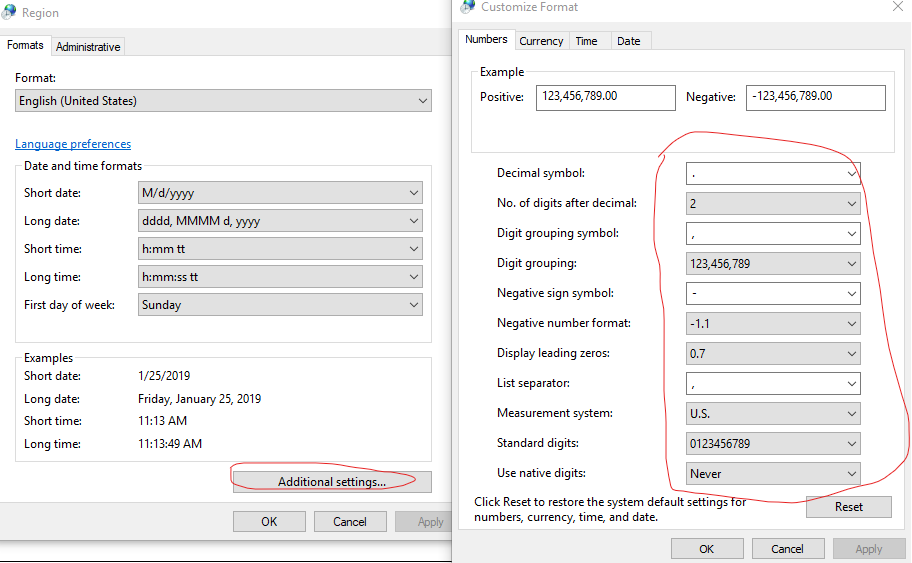
When you works on power bi desktop, it date and comma format will refer to system region setting, you can check it in control -> region settings.

11.png


If you publish to power bi service side, your visual title and comma will refer to power bi service language.(you can find it at 'setting -> general -> language')


Regards,
Xiaoxin Sheng

It's weird because I changed it in my computer and it works perfectly , then i changed it in my boss computer and in Internet Explorer looks correctly, but in Chrome that is the most used browser in the company, keeps looking in the old format, I deleted cache and all the data of the browser and still getting the problem..


Helpful resources

Announcements
Power BI DataViz World Championships

Power BI Dataviz World Championships

The Power BI Data Visualization World Championships is back! Get ahead of the game and start preparing now!

December 2025 Power BI Update Carousel

Power BI Monthly Update - December 2025

Check out the December 2025 Power BI Holiday Recap!

FabCon Atlanta 2026 carousel

FabCon Atlanta 2026

Join us at FabCon Atlanta, March 16-20, for the ultimate Fabric, Power BI, AI and SQL community-led event. Save $200 with code FABCOMM.