Hello,
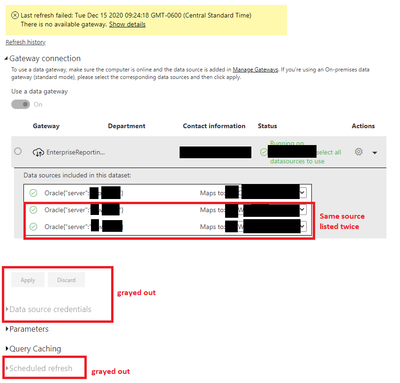
I would appreciate any help. Starting at the beginning of November, I've run into the following issue: When I add a new data source to an existing report and republish, I am no longer able to save the dataset mapping and schedule refreshes. I get an error that there is no available gateway.
The data source that I added is now showing up twice to map and I am not able to select "Apply" to save the mappings.
Setting the credentails and scheduling the refresh is also greyed out.
I have been able to get around this in two ways, but I am wondering if anyone else has a more elegant method.
1. by removing the existing dataset from the Power BI service and publishing as new. Not ideal as it will break any existing links to reports
2. asking a co-worker to take-over the dataset. After that, I can go in and take-over the data set again and it is all cleared.
Has anyone else had this issue, and how did you solve it?


