Share feedback directly with Fabric product managers, participate in targeted research studies and influence the Fabric roadmap.
Sign up nowGet Fabric certified for FREE! Don't miss your chance! Learn more
I'm using new matrix since it allows to click and filter the page elemnts (not possible in other matrixs).
To have a flat format, I put all my fileds in value group insted of row goup, but this seems to change some information.
LAYOUT 1
PM field in in the row goup
WORK_ID = 1035
PM = Casabianca Giovanni (correct)
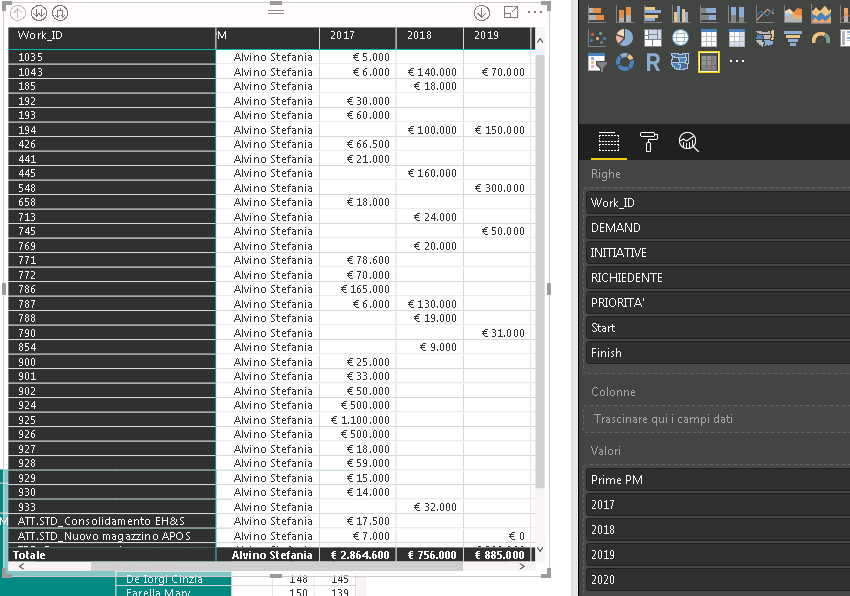
LAYOUT 2
PM field in in the column goup
WORK_ID = 1035
PM = Alvino Stefania (correct)
WORK_ID and PM are fileds of different table with a relationship 1-1.
In your second image, if you put the PM field in Value box, this field will be aggregated so that it will show the incorrect data. You should put it in Row Group. However, it will be populated into next level within same column. Since you need a flat format, I suggest you still use table visual and use a sclier to filter data. I suggest you post a feature request on idea.
Regards,
I take your point about putting the filed in the VALUE box and the aggregation bahaviour.
However, for each value in the ROW group there is only one corresponding value for fileds in VALUE group and the aggregation should return the correct value.
It could be a mistake in data selection of the New Matrix
Regards
If you love stickers, then you will definitely want to check out our Community Sticker Challenge!
Check out the January 2026 Power BI update to learn about new features.
| User | Count |
|---|---|
| 19 | |
| 10 | |
| 8 | |
| 7 | |
| 7 |
| User | Count |
|---|---|
| 51 | |
| 43 | |
| 30 | |
| 27 | |
| 25 |