cancel
Showing results for 
Search instead for 
Did you mean: 

The Power BI Data Visualization World Championships is back! Get ahead of the game and start preparing now! Learn more

Reply
vmgv2023
Regular Visitor

New card visual bug

A problem with the new card visual, in the desktop version, I make the correct edits in the explanatory text, with the proper spacing between the label and the values. When I publish the report, the spacing changes in the online version, and the values and labels are at opposite ends of the card.


I'm using the new card precisely because of the image feature. When I remove the image, the visual is correct.


This problem started a few weeks ago; it was working correctly before.

1 ACCEPTED SOLUTION
Anonymous
Not applicable

Hi @vmgv2023 ,

The issue has fixed now, please have a try.


Best Regards
Community Support Team _ Rongtie

If this post helps, then please consider Accept it as the solution to help the other members find it more quickly.

View solution in original post

6 REPLIES 6
Anonymous
Not applicable

Hi @vmgv2023 ,

The issue has fixed now, please have a try.


Best Regards
Community Support Team _ Rongtie

If this post helps, then please consider Accept it as the solution to help the other members find it more quickly.

The problem remains the same here.
arvindsingh802
Super User
Super User

This is known issue, MS team is working on this
https://learn.microsoft.com/en-us/power-bi/troubleshoot/known-issues/known-issue-535-new-card-visual... 


If this post helps, then please consider Accept it as the solution, Appreciate your Kudos!!
Proud to be a Super User!!

Thank you for the response, but this issue with the posting concerns another one that I also identified, but the current one alters the formatting of the displayed values' positioning, even without the shadow or bar formatting

Anonymous
Not applicable

Hi @vmgv2023 ,

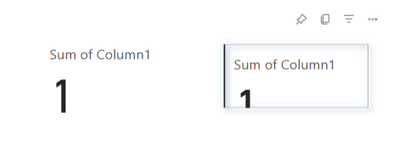
Is it like the following?

vrongtiepmsft_0-1698890991664.png


If so, have submitted this issue internal to confirm, would update here as soon as possible if there is any update about it. If not, please provide more details.


Best Regards
Community Support Team _ Rongtie

If this post helps, then please consider Accept it as the solution to help the other members find it more quickly.

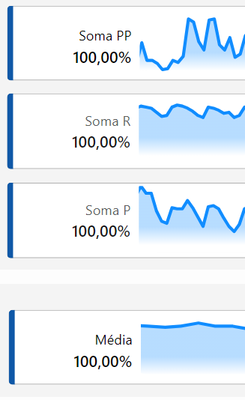
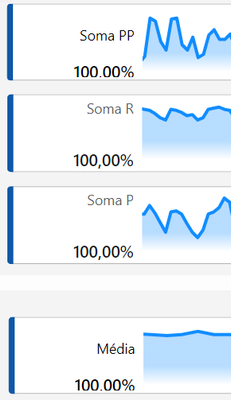
It's similar to that, it follows in this manner:

It should appear in this way, as it does on the desktop.

image.png


But when published, it appears in this way.

image.png


Helpful resources

Announcements
Power BI DataViz World Championships

Power BI Dataviz World Championships

The Power BI Data Visualization World Championships is back! Get ahead of the game and start preparing now!

December 2025 Power BI Update Carousel

Power BI Monthly Update - December 2025

Check out the December 2025 Power BI Holiday Recap!

FabCon Atlanta 2026 carousel

FabCon Atlanta 2026

Join us at FabCon Atlanta, March 16-20, for the ultimate Fabric, Power BI, AI and SQL community-led event. Save $200 with code FABCOMM.