Get certified for free when you join Fabric Data Days 2026 and dive into Fabric, Power BI, SQL, AI, and other essential data skills.
Join nowData Days is here! Join us now for 60+ days of learning, challenges, and connection. Learn more
Hi. I can't add my network folder path to my existing Gateway as a data source. When I refresh data within power bi desktop it works just fine and connects to an excel spreadsheet. I'm using Excel file connector. However, in power bi services it doesn't let me add the source.
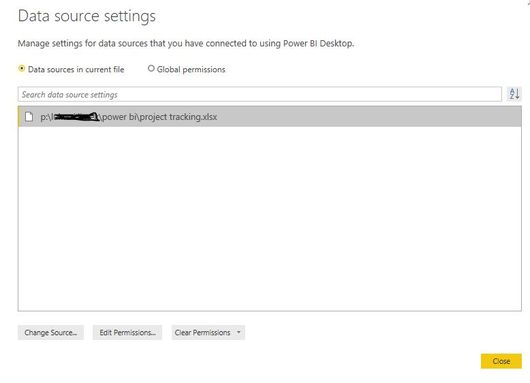
Below is the path to get to an excel file within power bi desktop:
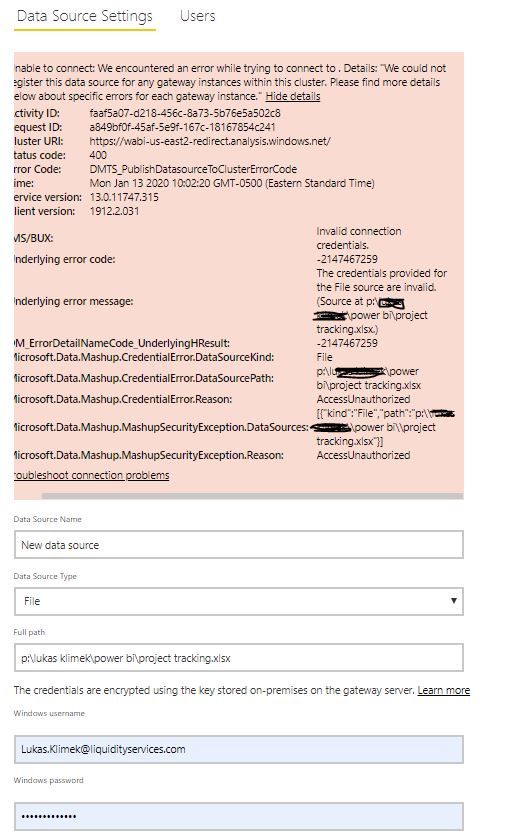
Below is an error I'm receiving. I tried to use my full email address and also other variations but it shows that my credentials are invalid.
Solved! Go to Solution.
Hi @Anonymous
1. If you can access your file / folder in the File Explorer(Or you can try to add a network location by right click in File explorer), you can directly connect them in power bi desktop via excel/csv/folder connector, after you publish this report to power bi service, the direction should be exist in "Settings" - "Datasets" - "Gateway Connections".
2. Use the full path of the server/folder - you likely have the network drive mapped to one of your local drives. It needs to be the full path, not the mapped one.
3. I'd like to recommend using parameters.
Please refer to: https://community.powerbi.com/t5/Power-Query/Data-Sources-with-Data-Gateway/m-p/720082
More to this topic: Deep Dive into Query Parameters and Power BI Templates
Hi @Anonymous
1. If you can access your file / folder in the File Explorer(Or you can try to add a network location by right click in File explorer), you can directly connect them in power bi desktop via excel/csv/folder connector, after you publish this report to power bi service, the direction should be exist in "Settings" - "Datasets" - "Gateway Connections".
2. Use the full path of the server/folder - you likely have the network drive mapped to one of your local drives. It needs to be the full path, not the mapped one.
3. I'd like to recommend using parameters.
Please refer to: https://community.powerbi.com/t5/Power-Query/Data-Sources-with-Data-Gateway/m-p/720082
More to this topic: Deep Dive into Query Parameters and Power BI Templates
Don't miss out on Data Days, June 15 through August 7. Learn Fabric, Power BI, SQL, AI and more.
Check out the May 2026 Power BI update to learn about new features.
| User | Count |
|---|---|
| 16 | |
| 10 | |
| 10 | |
| 8 | |
| 7 |
| User | Count |
|---|---|
| 40 | |
| 36 | |
| 34 | |
| 28 | |
| 20 |