Get Fabric or SQL Certified for Free.
Get certified for free when you join Fabric Data Days 2026 and dive into Fabric, Power BI, SQL, AI, and other essential data skills.
Join now- Power BI forums
- Get Help with Power BI
- Desktop
- Service
- Report Server
- Power Query
- Mobile Apps
- Developer
- DAX Commands and Tips
- Custom Visuals Development Discussion
- Health and Life Sciences
- Power BI Spanish forums
- Translated Spanish Desktop
- Training and Consulting
- Instructor Led Training
- Dashboard in a Day for Women, by Women
- Galleries
- Data Stories Gallery
- Themes Gallery
- Contests Gallery
- QuickViz Gallery
- Quick Measures Gallery
- Visual Calculations Gallery
- Notebook Gallery
- Translytical Task Flow Gallery
- TMDL Gallery
- R Script Showcase
- Webinars and Video Gallery
- Ideas
- Custom Visuals Ideas (read-only)
- Issues
- Issues
- Events
- Upcoming Events
July 7 - July 17 | Round 2 of the Power BI Dataviz World Championships. Don't miss your chance! Learn more
- Power BI forums
- Forums
- Get Help with Power BI
- Service
- Need help - Moving Average Formula ERROR
- Subscribe to RSS Feed
- Mark Topic as New
- Mark Topic as Read
- Float this Topic for Current User
- Bookmark
- Subscribe
- Printer Friendly Page

- Mark as New
- Bookmark
- Subscribe
- Mute
- Subscribe to RSS Feed
- Permalink
- Report Inappropriate Content
Need help - Moving Average Formula ERROR
Hello,
I am new to Power BI and DAX. I am trying to create a measure for calculating the moving average of 3 monthly sales by area on Power BI Desktop/Service. I have googled many websites but cannot find out what's problem in my DAX formula below..
On the dashboard there is a slicer for area, and also a timeline slicer for date, so the user can analyze the dashboard data for a month or quarter. I want to add a moving average line in the sales bar chart by months.
I tried below DAX formula:
[3 Month Moving Sum Sales] =
CALCULATE([Sales],
DATESINPERIOD(Calendar[Date],
LASTDATE(Calendar[Date]),-3, Month
) / 3
However, it always displays the same value regradless which time period I select in timeline slicer. It shows the average of latest 3 months data in my data table rather the latest 3 months data I selected in slicer.
In my calendar table, I only include the date exist in data table (e.g. 1-jan-2015, 1-feb-2015, etc..) instead of all consquence dates (1-jan-2015, 2-jan-2015, ...)
Below are my data table.
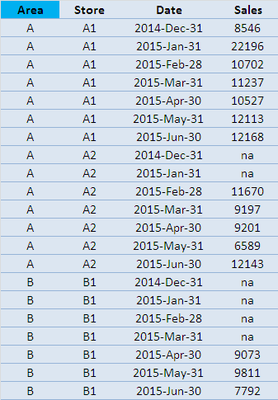
Thank you!
Solved! Go to Solution.


- Mark as New
- Bookmark
- Subscribe
- Mute
- Subscribe to RSS Feed
- Permalink
- Report Inappropriate Content
HI, just did one of these this morning for a 6 wk rolling average $/kg:
calculate(sum(Data[Operating]),DATESBETWEEN(Data[Week start],LASTDATE(Data[Week start])-42,FIRSTDATE(Data[Week start])))
/
calculate(sum(Data[kg]),DATESBETWEEN(Data[Week start],LASTDATE(Data[Week start])-42,FIRSTDATE(Data[Week start])))
- Mark as New
- Bookmark
- Subscribe
- Mute
- Subscribe to RSS Feed
- Permalink
- Report Inappropriate Content
Oh man I also see your data has 'na' on it. I bet thats a text column. try making another column with value([sales]) or alternately re import the table with the field formatted as number not text.
- Mark as New
- Bookmark
- Subscribe
- Mute
- Subscribe to RSS Feed
- Permalink
- Report Inappropriate Content
HI, just did one of these this morning for a 6 wk rolling average $/kg:
calculate(sum(Data[Operating]),DATESBETWEEN(Data[Week start],LASTDATE(Data[Week start])-42,FIRSTDATE(Data[Week start])))
/
calculate(sum(Data[kg]),DATESBETWEEN(Data[Week start],LASTDATE(Data[Week start])-42,FIRSTDATE(Data[Week start])))


- Mark as New
- Bookmark
- Subscribe
- Mute
- Subscribe to RSS Feed
- Permalink
- Report Inappropriate Content
@desiree in power bi desktop, relationship view check that relation exists between two tables ie calendar table date column and date column in your sales table and for that relationship to exist you need dates in sales table for the dates in calendar table.
- Mark as New
- Bookmark
- Subscribe
- Mute
- Subscribe to RSS Feed
- Permalink
- Report Inappropriate Content
@ankitpatira , I have already joined the dates in sales table and calendar table.... Do you have any other idea?
Thank you.
- Mark as New
- Bookmark
- Subscribe
- Mute
- Subscribe to RSS Feed
- Permalink
- Report Inappropriate Content
- Mark as New
- Bookmark
- Subscribe
- Mute
- Subscribe to RSS Feed
- Permalink
- Report Inappropriate Content
@ankitpatira , yes.. I used pivottable to get the unique dates from Sales table to prepare Calendar table.

- Mark as New
- Bookmark
- Subscribe
- Mute
- Subscribe to RSS Feed
- Permalink
- Report Inappropriate Content
I had the same issue. I used this blog post and made changes to my DAX. It works perfectly. I do not remember what caused my issues but here is the link to the post:
http://www.powerpivotpro.com/2013/07/moving-averages-sums-etc/
Did I answer your question? Mark my post as a solution!
Proud to be a Super User!

Helpful resources

FabCon & SQLCon – Barcelona 2026
Join us in Barcelona for FabCon and SQLCon, the Fabric, Power BI, SQL, and AI community event. Save €200 with code FABCMTY200.

Data Days 2026
Join Data Days 2026: 60 days of free live/on-demand sessions, challenges, study groups, and certification opportunities.

Power BI DataViz World Championships - June 2026
A new Power BI DataViz World Championship is coming this June! Don't miss out on submitting your entry.

| User | Count |
|---|---|
| 25 | |
| 11 | |
| 10 | |
| 6 | |
| 5 |


