cancel
Showing results for 
Search instead for 
Did you mean: 

The Power BI Data Visualization World Championships is back! Get ahead of the game and start preparing now! Learn more

Reply
Seer_Bug
Helper I
Helper I

Monthly grand total based on 4 different tables

I have 4 different tables with errors and error opportunity for different Site/location for each month.

I have created measure to get the consolidated error count from all 4 tables and another measure to get a consolidated error opportunity from all 4 tables.

These measures are in a table called Site_location which has only Site ID and Site Name. 

What i need is Site wise error count and error opportunity  for each month. however what I am getting is only the grand total of all error for site -  not sure how to get month wise breakdown.  how do i create relationship for month. Will share more details if required.  Kindly help.

Sample data :


Order NumberMonthEmp NameLineSiteErrorError Opportunity
123JuneABVUK11
23JunertWUSA02
34JulyYUVUSA01
45JulyABVUK01
1JuneABVUK11
2JunertWUSA02
4JulyYUVUSA11
3JulyABVUK01


Expected result  for error % : 

SiteJuneJuly
UK100%0%
USA0%50%

this is based on the calculation sum of errors for UK for June divided by sum of error opportunities for UK for June eg., for June Uk had 2 errors  divided by 2 error opportunities


later will have to present this in chart format

@Greg_Deckler 

6 REPLIES 6
Anonymous
Not applicable

Hi @Seer_Bug ,

You can create a measure as below:

error % = DIVIDE(SUM('Site info'[Error]),SUM('Site info'[Error Opportunity]),0)

Monthly grand total based on 4 different tables.JPG

Best Regards

Rena

Hi Rena, thanks for responding, i have 4 such tables where i need to consolidate similar data month wise.  

Anonymous
Not applicable

Hi @Seer_Bug ,

Could you please provide the structure and sample data of these 4 tables and existed relationships among these 4 tables?

Best Regards

Rena

Greg_Deckler
Community Champion
Community Champion

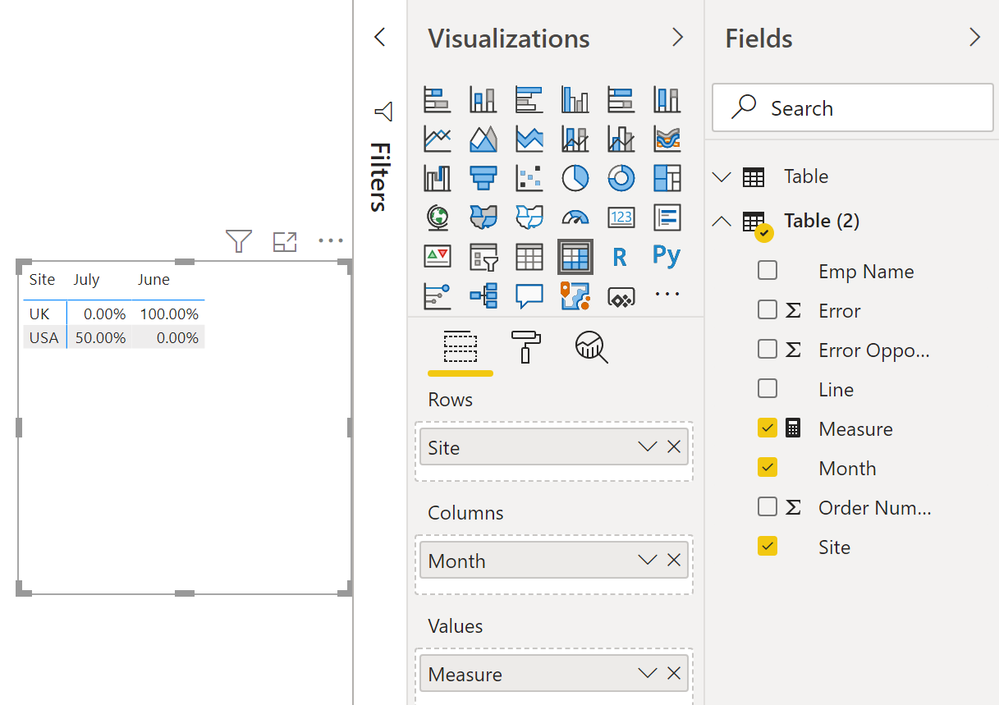
OK @Seer_Bug, using your updated information I did this:


Measure = SUM('Table (2)'[Error]) / SUM('Table (2)'[Error Opportunity])
 
image.png


Follow on LinkedIn
@ me in replies or I'll lose your thread!!!
Instead of a Kudo, please vote for this idea
Become an expert!: Enterprise DNA
External Tools: MSHGQM
YouTube Channel!: Microsoft Hates Greg
Latest book!:
DAX For Humans

DAX is easy, CALCULATE makes DAX hard...

Thanks for responding. with one table i have done the sum, However i have 4 such different table, wherein I need the output  as a consolidation  from all tables month wise

Greg_Deckler
Community Champion
Community Champion

@Seer_Bug Not really enough information to go on, please first check if your issue is a common issue listed here: https://community.powerbi.com/t5/Community-Blog/Before-You-Post-Read-This/ba-p/1116882

Also, please see this post regarding How to Get Your Question Answered Quickly: https://community.powerbi.com/t5/Community-Blog/How-to-Get-Your-Question-Answered-Quickly/ba-p/38490

The most important parts are:
1. Sample data as text, use the table tool in the editing bar
2. Expected output from sample data
3. Explanation in words of how to get from 1. to 2.


Follow on LinkedIn
@ me in replies or I'll lose your thread!!!
Instead of a Kudo, please vote for this idea
Become an expert!: Enterprise DNA
External Tools: MSHGQM
YouTube Channel!: Microsoft Hates Greg
Latest book!:
DAX For Humans

DAX is easy, CALCULATE makes DAX hard...

Helpful resources

Announcements
Power BI DataViz World Championships

Power BI Dataviz World Championships

The Power BI Data Visualization World Championships is back! Get ahead of the game and start preparing now!

December 2025 Power BI Update Carousel

Power BI Monthly Update - December 2025

Check out the December 2025 Power BI Holiday Recap!

FabCon Atlanta 2026 carousel

FabCon Atlanta 2026

Join us at FabCon Atlanta, March 16-20, for the ultimate Fabric, Power BI, AI and SQL community-led event. Save $200 with code FABCOMM.