Advance your Data & AI career with 50 days of live learning, dataviz contests, hands-on challenges, study groups & certifications and more!
Get registeredGet Fabric Certified for FREE during Fabric Data Days. Don't miss your chance! Request now
Hi Expert
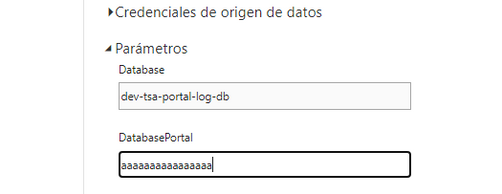
I have one question, i create two parameters in the POWER BI DESKTOP, when i upload the to power bi service, i can only edit one of them and the other not
The image show, one with the cursor, i can modify, but not the first one, what is the reason?
The parameter are exactly the same type and create using the same rules.
Thanks in advance, Fernando
Solved! Go to Solution.
Hi @Anonymous ,
According to the description on the official website:
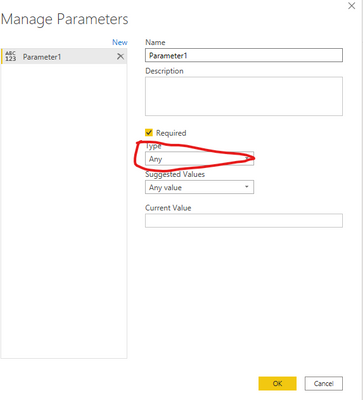
Grayed-out fields aren't editable. "Any" or "Binary" type parameters work in Power BI Desktop, but we currently don't support them in the service, for security reasons.Check your parameter type:
Wish it is helpful for you!
Best Regards
Lucien
Thanks!
I have modified to text, and now can edit
Fernando
Advance your Data & AI career with 50 days of live learning, contests, hands-on challenges, study groups & certifications and more!
Check out the October 2025 Power BI update to learn about new features.
| User | Count |
|---|---|
| 52 | |
| 21 | |
| 11 | |
| 11 | |
| 10 |