cancel
Showing results for 
Search instead for 
Did you mean: 

The Power BI Data Visualization World Championships is back! Get ahead of the game and start preparing now! Learn more

Reply
Anonymous
Not applicable

Modify parameter in Power bi Service

Hi Expert


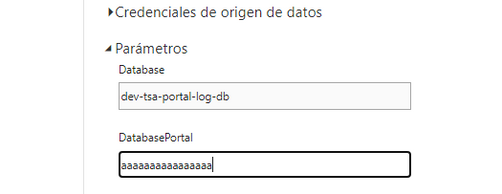
I have one question, i create two parameters in the POWER BI DESKTOP, when i upload the to power bi service, i can only edit one of them and the other not

fkeuroglian_0-1628532748345.png


The image show, one with the cursor, i can modify, but not the first one, what is the reason?

The parameter are exactly the same type and create using the same rules.


Thanks in  advance, Fernando

1 ACCEPTED SOLUTION
Anonymous
Not applicable

Thanks!

I have modified to text, and now can edit


Fernando

View solution in original post

2 REPLIES 2
v-luwang-msft
Community Support
Community Support

Hi @Anonymous ,

According to the description on the official website

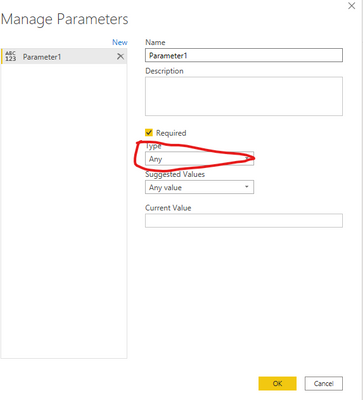
Grayed-out fields aren't editable. "Any" or "Binary" type parameters work in Power BI Desktop, but we currently don't support them in the service, for security reasons.Check your  parameter type:

vluwangmsft_0-1628733734247.png


Wish it is helpful for you!


Best Regards

Lucien

Anonymous
Not applicable

Thanks!

I have modified to text, and now can edit


Fernando

Helpful resources

Announcements
November Power BI Update Carousel

Power BI Monthly Update - November 2025

Check out the November 2025 Power BI update to learn about new features.

Fabric Data Days Carousel

Fabric Data Days

Advance your Data & AI career with 50 days of live learning, contests, hands-on challenges, study groups & certifications and more!

FabCon Atlanta 2026 carousel

FabCon Atlanta 2026

Join us at FabCon Atlanta, March 16-20, for the ultimate Fabric, Power BI, AI and SQL community-led event. Save $200 with code FABCOMM.

Top Solution Authors