This time we’re going bigger than ever. Fabric, Power BI, SQL, AI and more. We're covering it all. You won't want to miss it.
Learn moreLevel up your Power BI skills this month - build one visual each week and tell better stories with data! Get started
Hi,
I would like to create a measure "heading" with sub-measures. When I create a new measure they dont end up in the hierarchy as in the example:
How do I do that?
/Mathilda
Solved! Go to Solution.
Hey @MathildaP ,
I'm not really sure what you want to achieve, as I'm a little confused by the naming.
Your screenshot doesn't show a hierarchy, it shows a measure table.
Measures don't have Sub-Measures. Maybe you mean you want your measure to be organized in folders?
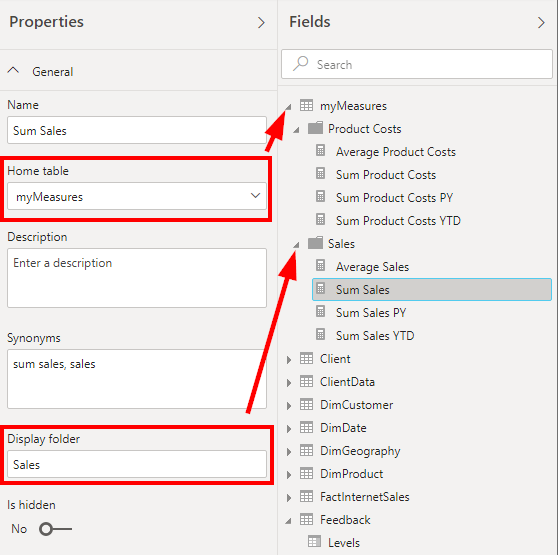
If you want to put a measure in a folder and in the measure table, then the best is to go to the model view and then change the home table and create a folder:
Hey @MathildaP ,
I'm not really sure what you want to achieve, as I'm a little confused by the naming.
Your screenshot doesn't show a hierarchy, it shows a measure table.
Measures don't have Sub-Measures. Maybe you mean you want your measure to be organized in folders?
If you want to put a measure in a folder and in the measure table, then the best is to go to the model view and then change the home table and create a folder:
Ah was it that easy! Thanks!
Check out the April 2026 Power BI update to learn about new features.
Sign up to receive a private message when registration opens and key events begin.
If you have recently started exploring Fabric, we'd love to hear how it's going. Your feedback can help with product improvements.
| User | Count |
|---|---|
| 10 | |
| 10 | |
| 7 | |
| 6 | |
| 5 |
| User | Count |
|---|---|
| 24 | |
| 23 | |
| 22 | |
| 21 | |
| 20 |