cancel
Showing results for 
Search instead for 
Did you mean: 

Try your skills in the Power BI Dataviz World Championship! Round one ends June 26. Join now

Reply
jeffshieldsdev
Solution Sage
Solution Sage

Max Parallelism Per Query stopped working?

I've been using this approach for a few weeks of changing Max Parallelism Per Query in a DirectQuery dataset published to a Premium capacity Workspace to have queries execute concurrently instead of consecutively:

DirectQuery parallelism in Power BI (crossjoin.co.uk)

It appears this stopped working recently.

I've tried reapplying the settings with Tabular Editor, and opening in Power BI Desktop, refreshing and republishing to Power BI Service, and reapplying configuration using Tabular Editor:
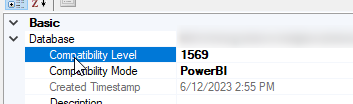
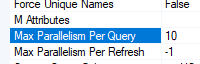
jeffshieldsdev_1-1698262618819.png

jeffshieldsdev_2-1698262627460.png

I'm still seeing a very much waterfall consecutive execution pattern in DAX Studio Server Timings tab:
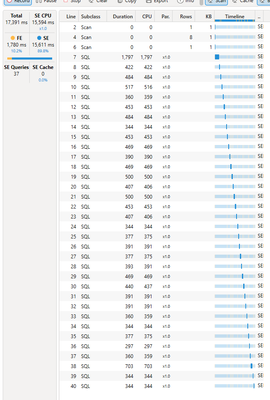
jeffshieldsdev_0-1698262573347.png

Is anyone else experiencing the same?

1 ACCEPTED SOLUTION
jeffshieldsdev
Solution Sage
Solution Sage

From Microsoft:

"product team have temporarily disabled parallelism for datasets utilizing aggregations. This decision was made due to internal errors that have risen with these datasets.


I am pleased to inform you that the product team has already fixed this issue. The fix is now (2023-11-09) ready for deployment on a cluster-by-cluster basis."


I have confirmed MaxParallelismPerQuery is being honored again.

View solution in original post

3 REPLIES 3
jeffshieldsdev
Solution Sage
Solution Sage

From Microsoft:

"product team have temporarily disabled parallelism for datasets utilizing aggregations. This decision was made due to internal errors that have risen with these datasets.


I am pleased to inform you that the product team has already fixed this issue. The fix is now (2023-11-09) ready for deployment on a cluster-by-cluster basis."


I have confirmed MaxParallelismPerQuery is being honored again.

GilbertQ
Super User
Super User

Hi @jeffshieldsdev 


I would suggest chatting to your Power BI Admin to see if they have made any changes to the capacity settings?


Did I answer your question? Mark my post as a solution!

Proud to be a Super User!


Power BI Blog

Thanks for the reply.

I am capacity admin and haven't made any changes.

Helpful resources

Announcements
Fabric Data Days is here Carousel

Data Days 2026

Don't miss out on Data Days, June 15 through August 7. Learn Fabric, Power BI, SQL, AI and more.

Power BI DataViz World Championships carousel

Power BI DataViz World Championships - June 2026

A new Power BI DataViz World Championship is coming this June! Don't miss out on submitting your entry.