cancel
Showing results for 
Search instead for 
Did you mean: 

Level up your Power BI skills this month - build one visual each week and tell better stories with data! Get started

Reply
NidhinNambiar
New Member

Line chart

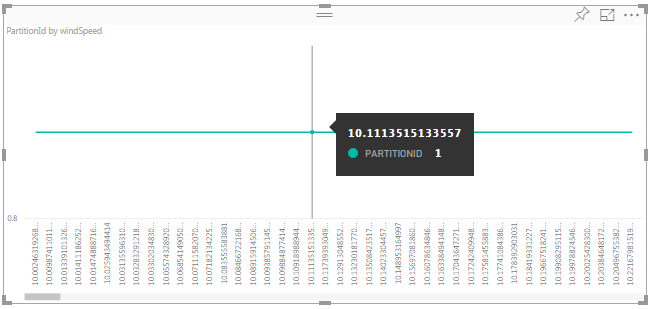
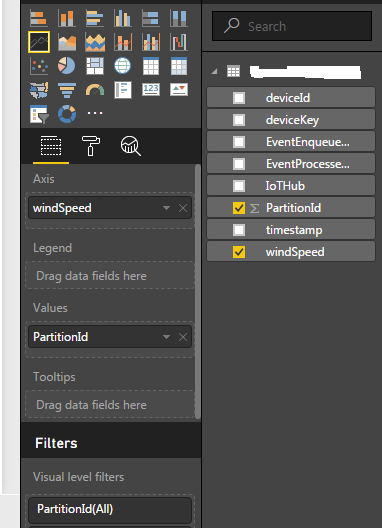
Hi everyone,partition.pngpartition1.png


This is a simple Power BI dataset report. I have used azure portal to create IotHub and get data into Power BI .

But, I really dont understand how it works, as until and unless I select partitionId as y axis, I dont get any graph generated.


I want to show windspeed vs timestamp line graph, but I am forced to show partitionId vs windspeed or partitionId vs timestamp! Why ?

How can I show windspeed vs timestamp?

Please suggest something with relevant samples, if possible


Thanks and Regards,

Nidhin Nambiar

Thanks and Regards,
Nidhin.K.Nambiar
1 REPLY 1
v-sihou-msft
Microsoft Employee
Microsoft Employee

@NidhinNambiar


In this scenario, if you want to show windspeed vs timestamp, you need to put windspeed on Values and put timestamp on Axis. You can drag field into visual Fields manually.


Regards

Helpful resources

Announcements
April Power BI Update Carousel

Power BI Monthly Update - April 2026

Check out the April 2026 Power BI update to learn about new features.

Fabric SQL PBI Data Days

Data Days 2026 coming soon!

Sign up to receive a private message when registration opens and key events begin.

New to Fabric survey Carousel

New to Fabric Survey

If you have recently started exploring Fabric, we'd love to hear how it's going. Your feedback can help with product improvements.

Power BI DataViz World Championships carousel

Power BI DataViz World Championships - June 2026

A new Power BI DataViz World Championship is coming this June! Don't miss out on submitting your entry.