cancel
Showing results for 
Search instead for 
Did you mean: 

Learn from the best! Meet the four finalists headed to the FINALS of the Power BI Dataviz World Championships! Register now

Reply
butlerjay87
Helper I
Helper I

Line Chart not rendering correctly with multiple lines

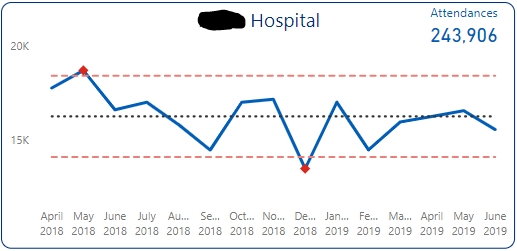
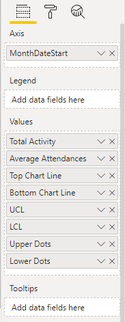
I have created my own Statistical Process Chart in Power BI - it is effectively a line chart with many lines (8 in this instance, some of them invisible/white and some are clear lines with only markers.


The chart renders perfectly in Desktop:

SPC Desktop.PNGSPC Menu.PNG

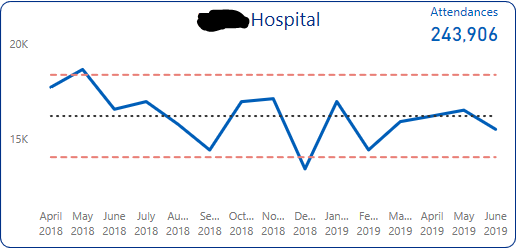
However, when this is published to Power BI Service and then published to web, the markers disappear:

SPC Service.PNG

If anyone is able to help, I would be greatful.

1 ACCEPTED SOLUTION
MattAllington
Community Champion
Community Champion

Strange. It could be a browser issue. Perhaps try a different browser and see. Also, try in the Mobile app. If it still doesn’t work, I suggest you open a ticket. 


* Matt is an 8 times Microsoft MVP (Power BI) and author of the Power BI Book Supercharge Power BI.
I will not give you bad advice, even if you unknowingly ask for it.

View solution in original post

2 REPLIES 2
MattAllington
Community Champion
Community Champion

Strange. It could be a browser issue. Perhaps try a different browser and see. Also, try in the Mobile app. If it still doesn’t work, I suggest you open a ticket. 


* Matt is an 8 times Microsoft MVP (Power BI) and author of the Power BI Book Supercharge Power BI.
I will not give you bad advice, even if you unknowingly ask for it.

Thank you Matt.. Having run it on three browsers it seems to be an isolated issue with Microsoft browsers Edge version 38.14393.1066.0 and Internet Explorer.


It does however, work on Google Chrome.

Helpful resources

Announcements
New to Fabric survey Carousel

New to Fabric Survey

If you have recently started exploring Fabric, we'd love to hear how it's going. Your feedback can help with product improvements.

Power BI DataViz World Championships carousel

Power BI DataViz World Championships - June 2026

A new Power BI DataViz World Championship is coming this June! Don't miss out on submitting your entry.

Join our Fabric User Panel

Join our Fabric User Panel

Share feedback directly with Fabric product managers, participate in targeted research studies and influence the Fabric roadmap.

March Power BI Update Carousel

Power BI Community Update - March 2026

Check out the March 2026 Power BI update to learn about new features.

Top Kudoed Authors