
cancel
Showing results for 
Search instead for 
Did you mean: 

Get Fabric Certified for FREE during Fabric Data Days. Don't miss your chance! Request now

Reply
Anonymous
Not applicable

Last Refresh Timestamp of Dataset is Missing

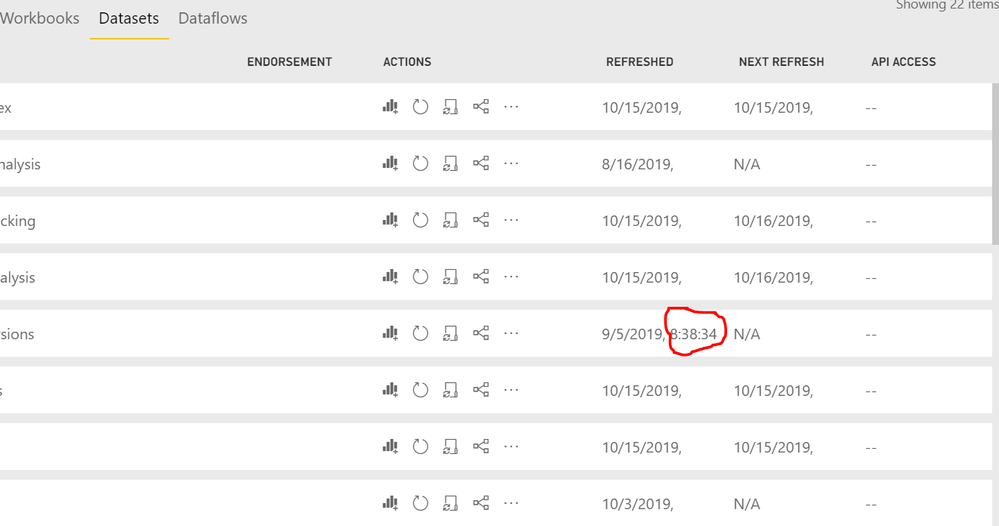
I'm not sure if a setting got changed on my computer, but I can no longer see the Last or Next Refresh Time of all but 1 of my datasets in Power BI Service. Is anyone else having this issue or know what the problem may be?


I've tried in both IE11 & Chrome.


Missing Timestamp.PNG

1 ACCEPTED SOLUTION
Anonymous
Not applicable


@foxb3692 Upon further review, I found out that I can collapse the navigation pane (which I never had to do before) to see the timestamp. I wish there was a way to resize the columns as this adds an extra step when I want to see the timestamp.

Capture2.PNG

View solution in original post

3 REPLIES 3
foxb3692
Helper I
Helper I

It seems to be tied to screen size and resolution. On my Surface Pro, I see the same as you, but when projecting to a 21" monitor, I see the full date and time.


Anonymous
Not applicable

@foxb3692  At first, I thought that was the exact problem as I was working from home on my 14" laptop monitor. It is, however, set to the highest resolution of 1920 x 1080. I am now in the office where I have a pair of 24" monitors (also set to 1920 x 1080) and unfortunately, the issue still exists. It looks as if the "Name" column got bigger and used some of the real estate from the "Refreshed" & "Next  Refresh" columns. I do not see a way to resize these. This is very strange as I do not remember the Name column being so big.


Capture.PNG

Anonymous
Not applicable


@foxb3692 Upon further review, I found out that I can collapse the navigation pane (which I never had to do before) to see the timestamp. I wish there was a way to resize the columns as this adds an extra step when I want to see the timestamp.

Capture2.PNG

Helpful resources

Announcements
November Power BI Update Carousel

Power BI Monthly Update - November 2025

Check out the November 2025 Power BI update to learn about new features.

Fabric Data Days Carousel

Fabric Data Days

Advance your Data & AI career with 50 days of live learning, contests, hands-on challenges, study groups & certifications and more!

FabCon Atlanta 2026 carousel

FabCon Atlanta 2026

Join us at FabCon Atlanta, March 16-20, for the ultimate Fabric, Power BI, AI and SQL community-led event. Save $200 with code FABCOMM.

Top Solution Authors
Top Kudoed Authors