Share feedback directly with Fabric product managers, participate in targeted research studies and influence the Fabric roadmap.
Sign up nowGet Fabric certified for FREE! Don't miss your chance! Learn more
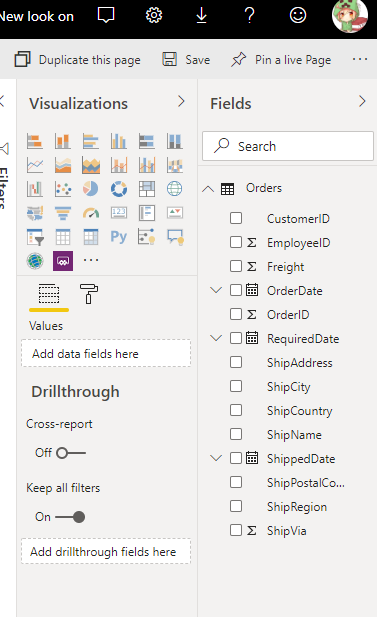
Expand the Fields and Visualizations pane on the right of the screen can't see the fields and visualizations pane
Solved! Go to Solution.
HI @bdori ,
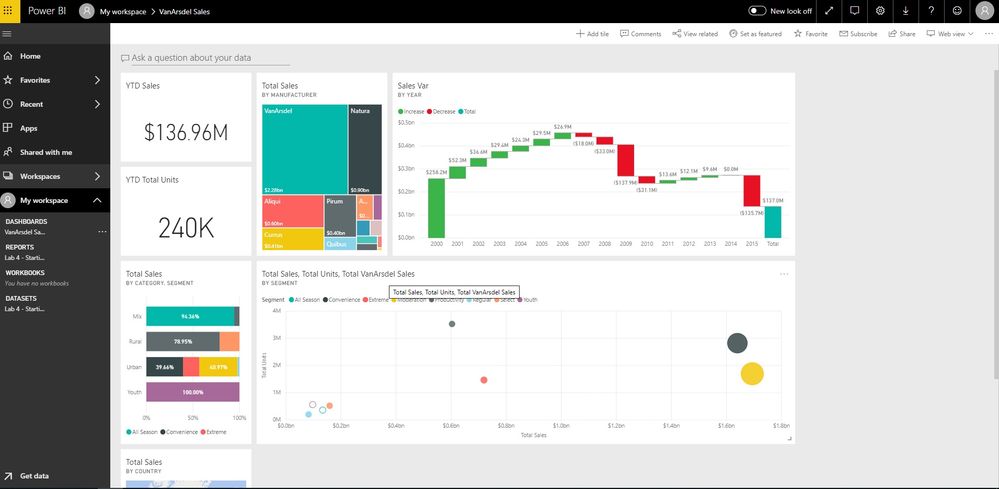
Visualizations and fields not available on the dashboard side, you can enter to 'report view -> edit' to find them.
Interact with a report in Editing view in Power BI service
Regards,
Xiaoxin Sheng
HI @bdori ,
I can't reproduce your issue, these panels works well on my side, can you please share some detail information?
How to Get Your Question Answered Quickly
Regards,
Xiaoxin Sheng
As shown in the screenshot on the right-hand side there are no visualizations and fields
HI @bdori ,
Visualizations and fields not available on the dashboard side, you can enter to 'report view -> edit' to find them.
Interact with a report in Editing view in Power BI service
Regards,
Xiaoxin Sheng
If you love stickers, then you will definitely want to check out our Community Sticker Challenge!
Check out the January 2026 Power BI update to learn about new features.
| User | Count |
|---|---|
| 18 | |
| 7 | |
| 7 | |
| 7 | |
| 7 |
| User | Count |
|---|---|
| 51 | |
| 43 | |
| 27 | |
| 27 | |
| 25 |